# State diagram

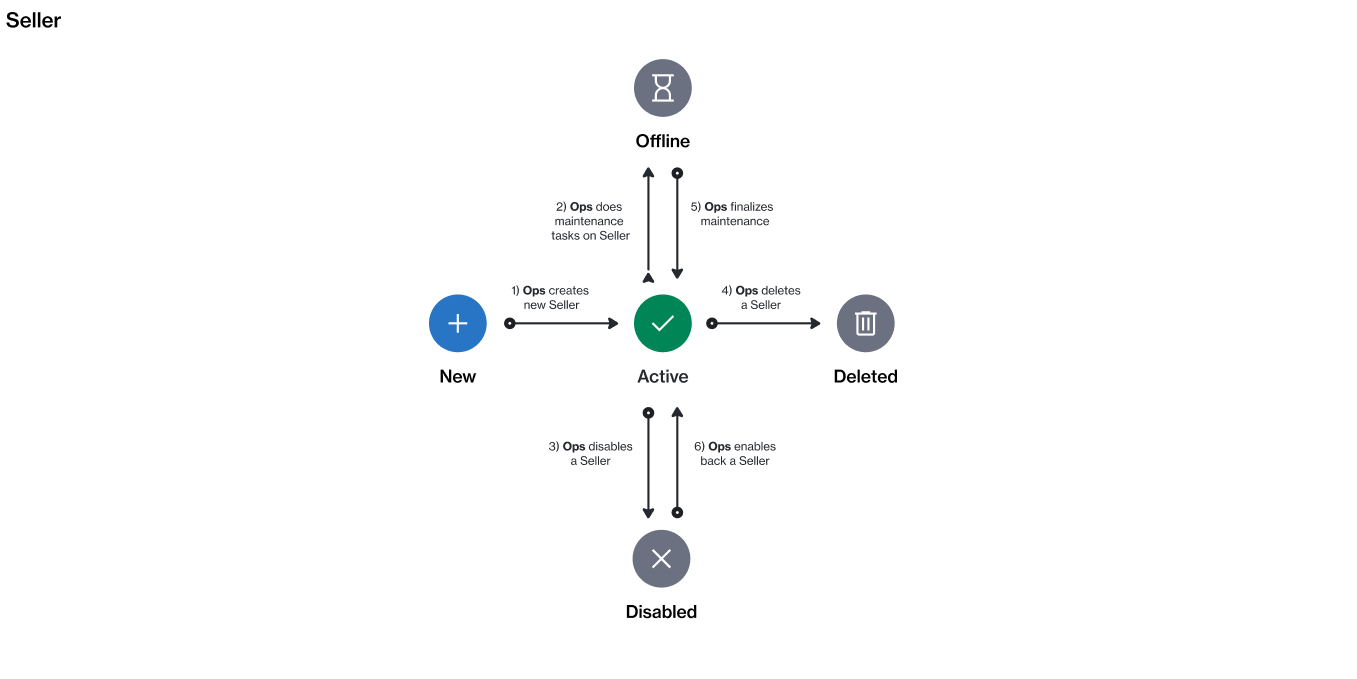
The following diagram shows the state (status) transition process of a seller in the platform.

<figure><img src="https://1674205915-files.gitbook.io/~/files/v0/b/gitbook-x-prod.appspot.com/o/spaces%2FZ5DNbniz33mXCZoO62Rm%2Fuploads%2FyctJRWclBfBfRlwfmGkZ%2Fimage.png?alt=media&#x26;token=7e155f5b-9ccf-4d9e-a64b-d3139ebe15da" alt=""><figcaption><p>The state transition diagram of a seller.</p></figcaption></figure>

<table><thead><tr><th width="111">State</th><th>Definition</th></tr></thead><tbody><tr><td><strong>Active</strong></td><td>The seller is active and available for transactions in the Marketplace.</td></tr><tr><td><strong>Offline</strong></td><td>The seller is unavailable or offline.</td></tr><tr><td><strong>Disabled</strong></td><td>The seller is not operational and cannot be used for transactions. However, you can still access any historical data related to the seller.</td></tr><tr><td><strong>Deleted</strong></td><td>The seller has been deleted. This status is not visible on the interface.</td></tr></tbody></table>
