# State diagram

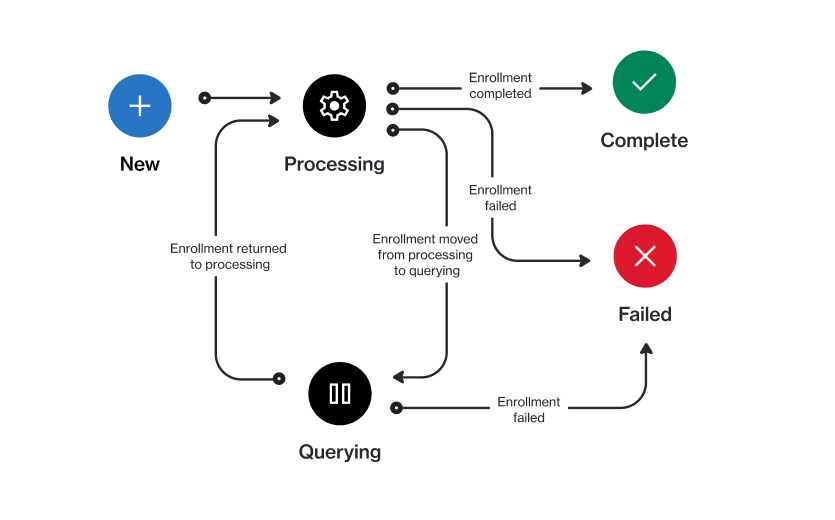
In the Marketplace Platform, an enrollment progresses through several states (also known as statuses) during its lifecycle. The following diagram shows the possible states and the transitions between these states:

<figure><img src="https://1674205915-files.gitbook.io/~/files/v0/b/gitbook-x-prod.appspot.com/o/spaces%2FZ5DNbniz33mXCZoO62Rm%2Fuploads%2FeHA27Zoj78BthWg2th7X%2Fstate_diagram_enrollment.png?alt=media&#x26;token=95016207-3c97-45dd-a2c2-2e8c7290ae55" alt=""><figcaption><p>The state transition diagram of an enrollment.</p></figcaption></figure>

<table data-full-width="false"><thead><tr><th width="152">State</th><th>Definition</th></tr></thead><tbody><tr><td><strong>New</strong></td><td>This is the initial status for a newly created enrollment in the platform.</td></tr><tr><td><strong>Processing</strong></td><td>The enrollment has been submitted, and it's undergoing approval processing.</td></tr><tr><td><strong>Querying</strong></td><td>The vendor requires more information to process your enrollment.</td></tr><tr><td><strong>Complete</strong></td><td>The vendor has approved your enrollment and activated your certificate.</td></tr><tr><td><strong>Failed</strong></td><td>The vendor has rejected your enrollment request.</td></tr></tbody></table>
