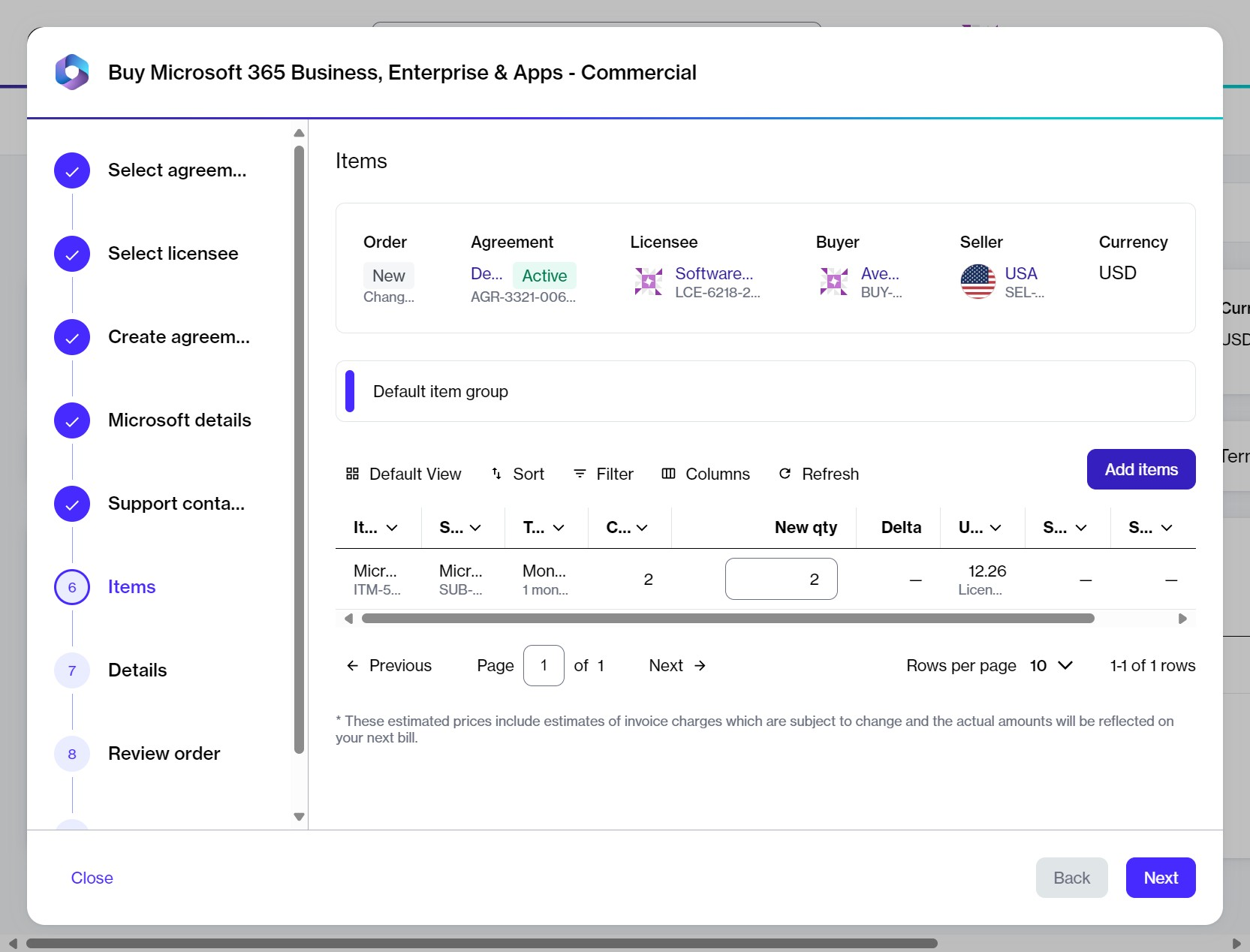
The option to add new items to your order.
The option to add new items to your order.
 **Filter** option in the grid.
2. Select **Add another condition** and then use the dropdown to make the following selections:
1. Select **Product Item Name**.
2. Set the filter to **Contains**.
3. Type the name of the required product (in this case, *Power BI*).
4. **Close** the filter box.
4. Select the items from the list. You can select multiple items.
{% hint style="info" %}
When selecting items, be sure to verify the billing terms and the duration of the subscription.
{% endhint %}
5. Select **Add items**. The items are added, and the **Select items** page is displayed.
6. In the **New qty** field, set the quantity of your newly added items. Then, select **Next**.
{% hint style="info" %}
In this step, you can also increase the quantities of the existing items.
{% endhint %}
{% endstep %}
{% step %}
**Submit your order**
1. **Details** – Add any reference details or comments, then select **Next**.
2. **Review order** – Review the order details, terms and conditions, and privacy statement, then select **Place order**.
3. **Summary** – Select **View details** to open the order details page or select **Close**.
{% endstep %}
{% endstepper %}
### Next steps
You can check the status of your new order on the **Orders** page or in the **Orders** tab on the agreement details page.
Once you place the order, the agreement status changes from **Active** to **Updating**. You won't be able to place any additional orders under this agreement until your current order has been processed and the agreement status is changed back to **Active**.
### Related tasks
{% content-ref url="/spaces/Z5DNbniz33mXCZoO62Rm/pages/cDxoD9xpYxQmm92me5Ga" %}
[Buy Microsoft 365 subscription for a new tenant](/extensions/microsoft-cloud-solution-provider/additional-resources/microsoft-365/order-microsoft-365-subscription-new-tenant.md)
{% endcontent-ref %}
{% content-ref url="/spaces/Z5DNbniz33mXCZoO62Rm/pages/vhDnLBr1O6YGeT0IzxS9" %}
[Buy Microsoft 365 subscription for an existing tenant](/extensions/microsoft-cloud-solution-provider/additional-resources/microsoft-365/order-microsoft-365-subscription-existing-tenant.md)
{% endcontent-ref %}
{% content-ref url="/spaces/Z5DNbniz33mXCZoO62Rm/pages/9Afx9ukLKDpQhilLPV0t" %}
[Purchase additional Microsoft 365 licenses](/extensions/microsoft-cloud-solution-provider/additional-resources/microsoft-365/buy-more-licenses-for-microsoft-365-subscription.md)
{% endcontent-ref %}
{% content-ref url="/spaces/Z5DNbniz33mXCZoO62Rm/pages/blBJuhBc4V2GfiYoKkhj" %}
[Reduce Microsoft 365 licenses](/extensions/microsoft-cloud-solution-provider/additional-resources/microsoft-365/reduce-microsoft-365-licenses.md)
{% endcontent-ref %}
{% content-ref url="/spaces/Z5DNbniz33mXCZoO62Rm/pages/zQRlTiakpGW024lFUe9O" %}
[Terminate Microsoft 365 agreement](/extensions/microsoft-cloud-solution-provider/additional-resources/microsoft-365/terminate-all-microsoft-subscriptions.md)
{% endcontent-ref %}
{% content-ref url="/spaces/Z5DNbniz33mXCZoO62Rm/pages/RdTSqeP2sdTBkrDietvW" %}
[Terminate Microsoft 365 subscription](/extensions/microsoft-cloud-solution-provider/additional-resources/microsoft-365/terminate-microsoft-subscription.md)
{% endcontent-ref %}
{% content-ref url="/spaces/Z5DNbniz33mXCZoO62Rm/pages/hkNeAk0joc4n1Ga5vM9F" %}
[Broken mention](broken://spaces/Z5DNbniz33mXCZoO62Rm/pages/hkNeAk0joc4n1Ga5vM9F)
{% endcontent-ref %}
---
# Agent Instructions
This documentation is published with GitBook. GitBook is the documentation platform designed so that both humans and AI agents can read, navigate, and reason over technical content effectively. Learn more at gitbook.com.
## Querying This Documentation
If you need additional information that is not directly available in this page, you can query the documentation by asking a question.
Perform an HTTP GET request on the following URL with the `ask` and `goal` query parameters:
```
GET https://docs.platform.softwareone.com/extensions/microsoft-cloud-solution-provider/additional-resources/microsoft-365/add-new-products-to-your-csp-agreement.md?ask=
**Filter** option in the grid.
2. Select **Add another condition** and then use the dropdown to make the following selections:
1. Select **Product Item Name**.
2. Set the filter to **Contains**.
3. Type the name of the required product (in this case, *Power BI*).
4. **Close** the filter box.
4. Select the items from the list. You can select multiple items.
{% hint style="info" %}
When selecting items, be sure to verify the billing terms and the duration of the subscription.
{% endhint %}
5. Select **Add items**. The items are added, and the **Select items** page is displayed.
6. In the **New qty** field, set the quantity of your newly added items. Then, select **Next**.
{% hint style="info" %}
In this step, you can also increase the quantities of the existing items.
{% endhint %}
{% endstep %}
{% step %}
**Submit your order**
1. **Details** – Add any reference details or comments, then select **Next**.
2. **Review order** – Review the order details, terms and conditions, and privacy statement, then select **Place order**.
3. **Summary** – Select **View details** to open the order details page or select **Close**.
{% endstep %}
{% endstepper %}
### Next steps
You can check the status of your new order on the **Orders** page or in the **Orders** tab on the agreement details page.
Once you place the order, the agreement status changes from **Active** to **Updating**. You won't be able to place any additional orders under this agreement until your current order has been processed and the agreement status is changed back to **Active**.
### Related tasks
{% content-ref url="/spaces/Z5DNbniz33mXCZoO62Rm/pages/cDxoD9xpYxQmm92me5Ga" %}
[Buy Microsoft 365 subscription for a new tenant](/extensions/microsoft-cloud-solution-provider/additional-resources/microsoft-365/order-microsoft-365-subscription-new-tenant.md)
{% endcontent-ref %}
{% content-ref url="/spaces/Z5DNbniz33mXCZoO62Rm/pages/vhDnLBr1O6YGeT0IzxS9" %}
[Buy Microsoft 365 subscription for an existing tenant](/extensions/microsoft-cloud-solution-provider/additional-resources/microsoft-365/order-microsoft-365-subscription-existing-tenant.md)
{% endcontent-ref %}
{% content-ref url="/spaces/Z5DNbniz33mXCZoO62Rm/pages/9Afx9ukLKDpQhilLPV0t" %}
[Purchase additional Microsoft 365 licenses](/extensions/microsoft-cloud-solution-provider/additional-resources/microsoft-365/buy-more-licenses-for-microsoft-365-subscription.md)
{% endcontent-ref %}
{% content-ref url="/spaces/Z5DNbniz33mXCZoO62Rm/pages/blBJuhBc4V2GfiYoKkhj" %}
[Reduce Microsoft 365 licenses](/extensions/microsoft-cloud-solution-provider/additional-resources/microsoft-365/reduce-microsoft-365-licenses.md)
{% endcontent-ref %}
{% content-ref url="/spaces/Z5DNbniz33mXCZoO62Rm/pages/zQRlTiakpGW024lFUe9O" %}
[Terminate Microsoft 365 agreement](/extensions/microsoft-cloud-solution-provider/additional-resources/microsoft-365/terminate-all-microsoft-subscriptions.md)
{% endcontent-ref %}
{% content-ref url="/spaces/Z5DNbniz33mXCZoO62Rm/pages/RdTSqeP2sdTBkrDietvW" %}
[Terminate Microsoft 365 subscription](/extensions/microsoft-cloud-solution-provider/additional-resources/microsoft-365/terminate-microsoft-subscription.md)
{% endcontent-ref %}
{% content-ref url="/spaces/Z5DNbniz33mXCZoO62Rm/pages/hkNeAk0joc4n1Ga5vM9F" %}
[Broken mention](broken://spaces/Z5DNbniz33mXCZoO62Rm/pages/hkNeAk0joc4n1Ga5vM9F)
{% endcontent-ref %}
---
# Agent Instructions
This documentation is published with GitBook. GitBook is the documentation platform designed so that both humans and AI agents can read, navigate, and reason over technical content effectively. Learn more at gitbook.com.
## Querying This Documentation
If you need additional information that is not directly available in this page, you can query the documentation by asking a question.
Perform an HTTP GET request on the following URL with the `ask` and `goal` query parameters:
```
GET https://docs.platform.softwareone.com/extensions/microsoft-cloud-solution-provider/additional-resources/microsoft-365/add-new-products-to-your-csp-agreement.md?ask=