> For the complete documentation index, see [llms.txt](https://docs.platform.softwareone.com/llms.txt). Markdown versions of documentation pages are available by appending `.md` to page URLs; this page is available as [Markdown](https://docs.platform.softwareone.com/extensions/microsoft-cloud-solution-provider/products-and-programs/perpetual-software/about-perpetual-software-orders.md).
# About perpetual software orders
A perpetual software order is a one-time purchase. You pay upfront and keep the license indefinitely.
Perpetual software orders are not subscriptions. They do not renew, and they do not require recurring payments.
### Supported products
You can order perpetual licenses for these products:
* Microsoft Perpetual Software - Commercial
* Microsoft Perpetual Software - Education
* Microsoft Perpetual Software - Charity
You can find these products on the **Catalog** > **Products** page.
### What to know before ordering
The following rules apply to perpetual software orders:
* Perpetual licenses require a one-time upfront payment.
* You cannot increase or decrease the quantity of licenses.
* After the order is complete and the license is set up, you can retrieve your product keys from the [Microsoft admin portal](https://admin.microsoft.com). For details, see [Download software and product license keys](https://learn.microsoft.com/en-us/microsoft-365/admin/setup/download-software-licenses-csp?view=o365-worldwide#download-software-and-product-license-keys).
* You can cancel within 30 days of the purchase date.
* To buy more licenses, you can submit a change order. For details, see [Order additional perpetual software licenses](/extensions/microsoft-cloud-solution-provider/additional-resources/perpetual-software/order-additional-perpetual-software-licenses.md).
### How ordering works
You order perpetual software by submitting a purchase order.
In most cases, you start from **Catalog** > **Products**, select **Microsoft Perpetual Software**, and create a new agreement as part of the order flow.
For step-by-step instructions, see [Buy perpetual software licenses](/extensions/microsoft-cloud-solution-provider/additional-resources/perpetual-software/buy-perpetual-software-licenses.md).
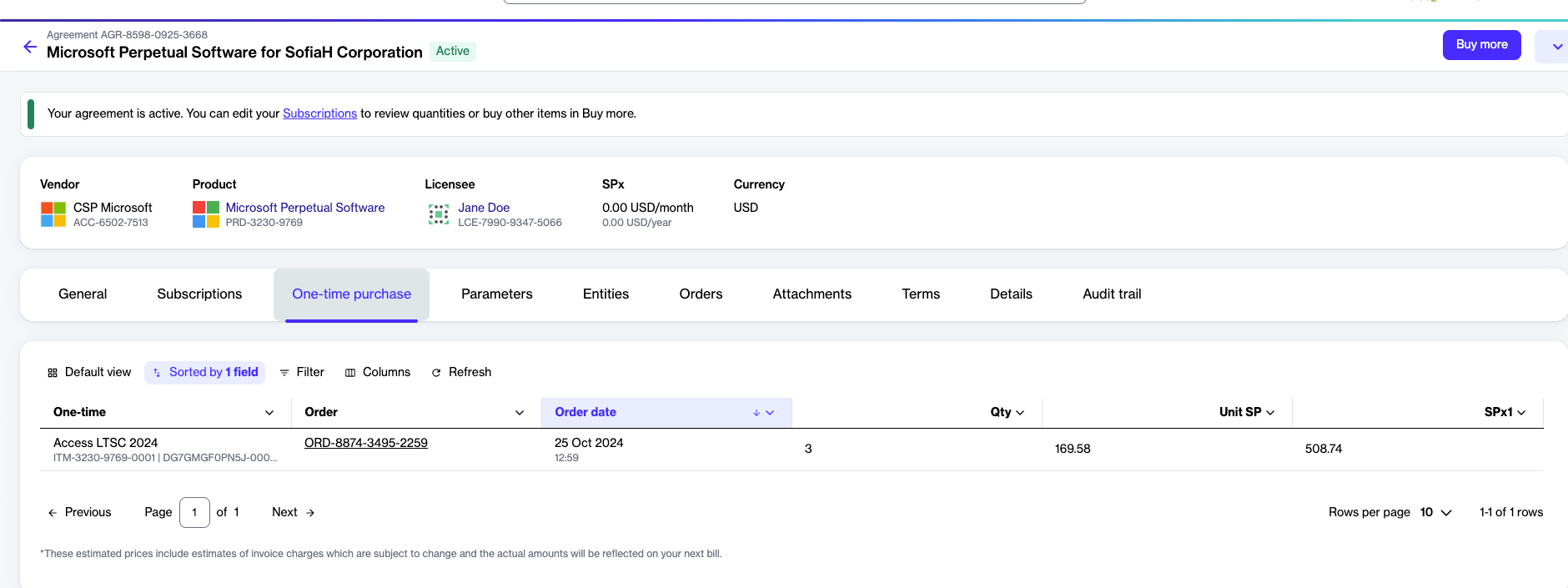
Perpetual software orders appear as a **one-time purchase** in the agreement details.
One-time purchases in the Marketplace Platform.
### How renewals work
Renewals are not supported for Microsoft Perpetual Software.
The license is provided for indefinite use following a one-time upfront payment.
### How cancellation works
You can cancel a perpetual software purchase within 30 days of the purchase date without incurring a termination fee.
For cancellations within the 30-day window:
* The associated software keys and download links are revoked.
* You are responsible for discontinuing use, uninstalling the software, and removing any downloads or links.
* The canceled item remains visible on the software details page in the [Microsoft Admin Center](https://admin.microsoft.com), but the activation key is disabled.
To cancel your purchase, contact [Marketplace Platform Support](/help-and-support/contact-support.md#contacting-marketplace-platform-support). Make sure to provide your order ID. We recommend that the cancellation request be made by someone within your organization who is authorized to request cancellations.
### Related tasks
* [Buy perpetual software licenses](/extensions/microsoft-cloud-solution-provider/additional-resources/perpetual-software/buy-perpetual-software-licenses.md)
* [Order additional perpetual software licenses](/extensions/microsoft-cloud-solution-provider/additional-resources/perpetual-software/order-additional-perpetual-software-licenses.md)
---
# Agent Instructions
This documentation is published with GitBook. GitBook is the documentation platform designed so that both humans and AI agents can read, navigate, and reason over technical content effectively. Learn more at gitbook.com.
## Querying This Documentation
If you need additional information that is not directly available in this page, you can query the documentation dynamically by asking a question.
Perform an HTTP GET request on the current page URL with the `ask` query parameter, and the optional `goal` query parameter:
```
GET https://docs.platform.softwareone.com/extensions/microsoft-cloud-solution-provider/products-and-programs/perpetual-software/about-perpetual-software-orders.md?ask=&goal=
```
`ask` is the immediate question: it should be specific, self-contained, and written in natural language.
`goal` is optional and describes the broader end goal you are ultimately trying to accomplish on behalf of the user. GitBook uses it to tailor the answer towards what is most useful for that goal.
The response will contain a direct answer to the question and relevant excerpts and sources from the documentation.
Use this mechanism when the answer is not explicitly present in the current page, you need clarification or additional context, or you want to retrieve related documentation sections.