> For the complete documentation index, see [llms.txt](https://docs.platform.softwareone.com/llms.txt). Markdown versions of documentation pages are available by appending `.md` to page URLs; this page is available as [Markdown](https://docs.platform.softwareone.com/modules-and-features/marketplace/assets.md).

# Assets

Assets are one-time purchase items or perpetual licenses.

​Unlike subscription items that require ongoing payments to keep the license active, a perpetual license remains valid indefinitely and doesn't require recurring payments. This means assets do not renew. You buy them once, then keep access based on the purchase terms.

​Use the **Assets** page to review your assets, open asset details, and track related orders, agreements, and activity.

### Assets page

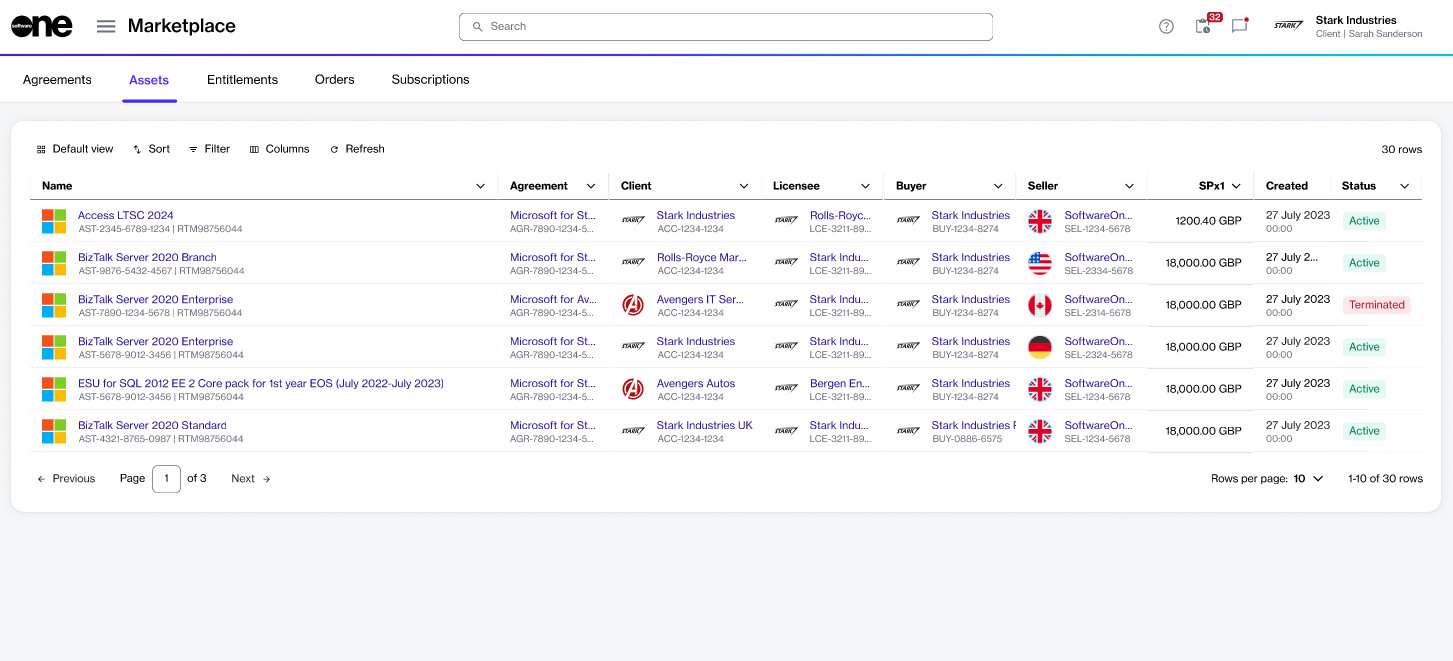
The **Assets** page shows all assets available to your organization.

To open the page, choose **Marketplace** > **Assets** from the main menu.

The list shows key details such as the asset name, agreement number, order number, estimated sales price, and status.&#x20;

Use [sort and filter options](/marketplace-platform/getting-started/customize-the-data-grid.md) to narrow the list. Use [show or hide specific columns](/marketplace-platform/getting-started/customize-the-data-grid.md#managing-columns) to adjust the table.

<div data-with-frame="true"><figure><img src="/files/a0Fj9kcdY6exxyqTWzTt" alt=""><figcaption><p>Use the Assets page to view and manage your one-time purchased items.</p></figcaption></figure></div>

### Open asset details <a href="#asset-details" id="asset-details"></a>

Select any asset to open its details page.

On the asset details page, you can view detailed information. Some information is read-only, while others include links that allow you to navigate to further details.

To open details for an asset:

1. Go to **Marketplace** > **Assets**.
2. Select the asset you want to view. The asset details page opens.
3. Use the tabs to view different types of information:

<table><thead><tr><th width="163">Tab</th><th>Description</th></tr></thead><tbody><tr><td><strong>General</strong></td><td>Shows the most up-to-date information for the asset.</td></tr><tr><td><strong>Entitlements</strong></td><td>Shows the purchased items, quantities, status, unit price, and estimated sales price (<code>SPx1</code>). For details, see <a href="/spaces/Z5DNbniz33mXCZoO62Rm/pages/SBIcGObEmLvlxJEwneoK">Entitlements</a>.</td></tr><tr><td><strong>Parameters</strong></td><td>Shows the parameters associated with the asset.</td></tr><tr><td><strong>Orders</strong></td><td>Shows the purchase order for the asset.</td></tr><tr><td><strong>Details</strong></td><td>Shows reference details such as additional IDs and timestamps. Use <strong>Edit</strong> to update the additional client ID.</td></tr><tr><td><strong>Audit trail</strong></td><td>Shows the record of events for the asset. For details, see <a href="/spaces/Z5DNbniz33mXCZoO62Rm/pages/JDfWpNZKSOWvWaQjaRbq">Audit Trail</a>.</td></tr></tbody></table>

{% hint style="info" %}
For assets, the billing model is always **one-time**. Assets do not include commitment terms or billing periods. For more information, see [What billing models does Marketplace support for items?](/help-and-support/faqs/what-billing-models-does-marketplace-support-for-items.md).
{% endhint %}

### Related topics

{% content-ref url="/spaces/Z5DNbniz33mXCZoO62Rm/pages/7r47jhKKq5VdPltQnUMx" %}
[Rename asset](/modules-and-features/marketplace/assets/rename-asset.md)
{% endcontent-ref %}

{% content-ref url="/spaces/Z5DNbniz33mXCZoO62Rm/pages/fGqHpke8ZsgJ7uw3XiiP" %}
[Asset states](/modules-and-features/marketplace/assets/asset-states.md)
{% endcontent-ref %}


---

# Agent Instructions
This documentation is published with GitBook. GitBook is the documentation platform designed so that both humans and AI agents can read, navigate, and reason over technical content effectively. Learn more at gitbook.com.

## Querying This Documentation
If you need additional information that is not directly available in this page, you can query the documentation dynamically by asking a question.

Perform an HTTP GET request on the current page URL with the `ask` query parameter:

```
GET https://docs.platform.softwareone.com/modules-and-features/marketplace/assets.md?ask=<question>
```

The question should be specific, self-contained, and written in natural language.
The response will contain a direct answer to the question and relevant excerpts and sources from the documentation.

Use this mechanism when the answer is not explicitly present in the current page, you need clarification or additional context, or you want to retrieve related documentation sections.
