> For the complete documentation index, see [llms.txt](https://docs.platform.softwareone.com/llms.txt). Markdown versions of documentation pages are available by appending `.md` to page URLs; this page is available as [Markdown](https://docs.platform.softwareone.com/modules-and-features/procurement/enterprise-agreements.md).
# Enterprise agreements
Optimize and simplify the Enterprise Agreement TrueUp process at a local or global scale from collection to license allocation.
The Microsoft Enterprise Agreement offers organizations a cost-effective way to acquire the latest Microsoft technology to help standardize IT infrastructure and simplify license management. A Microsoft Enterprise Agreement offers organizations a manageable volume-licensing program that gives them the flexibility to buy cloud services and software licenses under one agreement.
Once a year, customers are asked to align their Enterprise Agreement with the total number of licenses that they have added in the previous 12 months. This is the True-Up process: an inventory of all the qualified devices, users, and processors added over the course of the year.
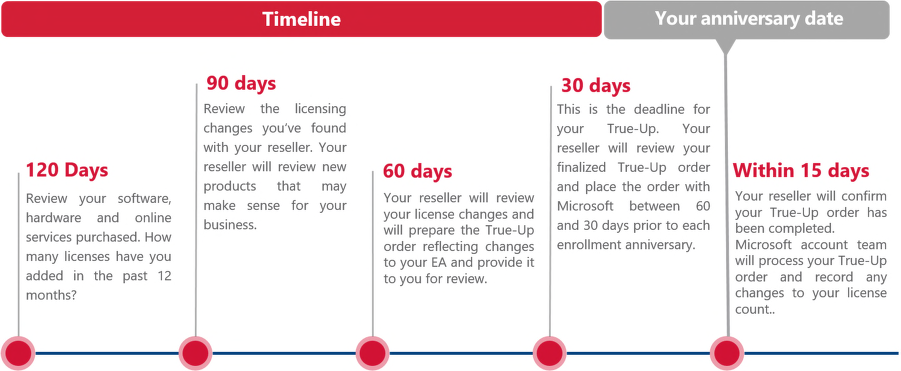
### EA TrueUp Timeline
Although organizations with Enterprise Agreements may place any number of orders throughout the calendar year, the annual TrueUp order must be received by Microsoft in the period between 60 days and 30 days prior to the anniversary of enrolment.
It is important to note that the annual TrueUp applies only to products that organizations have already licensed under their current Enterprise Agreement. New products and online services that are not in the current EA must be purchased in the month they are first used. If organizations have not increased device or user counts or used any additional Enterprise Agreement products within the calendar year, they still need to submit an Update Statement (also called a zero-usage order), which must be signed by an authorized signatory within the organization.
### EA TrueUp Module
The Enterprise Agreement TrueUp module helps customers optimize and simplify the EA TrueUp process with the power of a dedicated application instead of hundreds of Excel spreadsheets. The EA TrueUp Module can help manage this process on a local or global scale from collection to license allocation. For information on how to access and use the EA module, see [Enterprise Agreement TrueUp](/modules-and-features/procurement/enterprise-agreements/enterprise-agreement-trueup.md).
---
# Agent Instructions
This documentation is published with GitBook. GitBook is the documentation platform designed so that both humans and AI agents can read, navigate, and reason over technical content effectively. Learn more at gitbook.com.
## Querying This Documentation
If you need additional information that is not directly available in this page, you can query the documentation by asking a question.
Perform an HTTP GET request on the following URL with the `ask` and `goal` query parameters:
```
GET https://docs.platform.softwareone.com/modules-and-features/procurement/enterprise-agreements.md?ask=&goal=
```
`ask` is the immediate question: it should be specific, self-contained, and written in natural language.
`goal` is what the user is ultimately trying to achieve, the reason they need the answer. Sharing it helps GitBook give you a better, more relevant answer. A goal is most helpful when it describes the outcome the user wants rather than restating the question. For example, with `ask=how do I create an API token`, a goal like `automate deployments from our CI pipeline` lets GitBook tailor the answer to that use case.
The response will contain a direct answer to the question and relevant excerpts and sources from the documentation.
Use this mechanism when the answer is not explicitly present in the current page, you need clarification or additional context, or you want to retrieve related documentation sections.