# Certificate status

A certificate is an object that verifies a client or partner meets a vendor’s requirements and eligibility criteria for a specific program.&#x20;

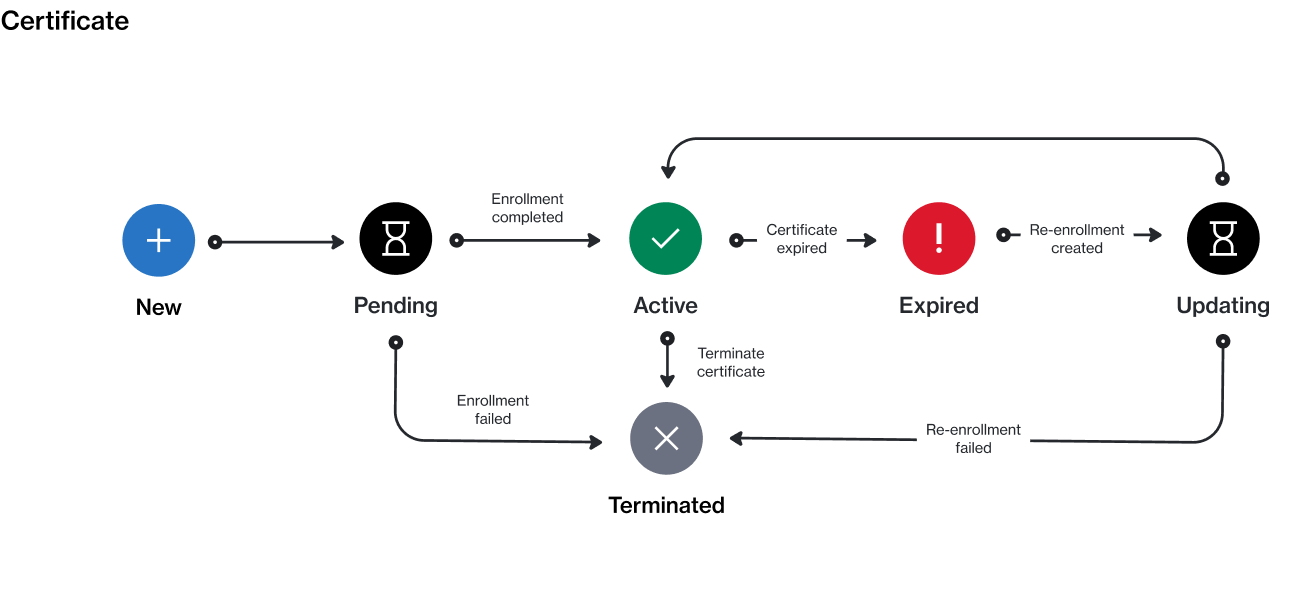
A certificate can currently exist in these states: **Pending**, **Active**, **Expired**, **Updating**, or **Terminated**. The following diagram shows the transitions between these states:

<figure><img src="/files/IgvFzrCigF4bNQU9V7Ll" alt=""><figcaption><p>The state transition diagram of a certificate.</p></figcaption></figure>

The following table provides a description of the different states:

<table data-full-width="false"><thead><tr><th width="152">State</th><th>Definition</th></tr></thead><tbody><tr><td><strong>New</strong></td><td>This is the initial or starting state. This state is assigned by the platform when the certificate request is created.</td></tr><tr><td><strong>Pending</strong></td><td>The certificate has been created, and it's awaiting approval by the vendor.</td></tr><tr><td><strong>Active</strong></td><td>The certificate is active.</td></tr><tr><td><strong>Expired</strong></td><td>The certificate has expired. You can renew an expired certificate by <a href="/pages/YzC2sw6FwauSD8kFPHT5">re-enrolling in the program</a>.</td></tr><tr><td><strong>Updating</strong></td><td>The certificate is being updated due to re-enrollment in the program.</td></tr><tr><td><strong>Terminated</strong></td><td>The certificate has been terminated. Terminated certificates can't be used to re-enroll in a program. </td></tr></tbody></table>


---

# Agent Instructions: Querying This Documentation

If you need additional information that is not directly available in this page, you can query the documentation dynamically by asking a question.

Perform an HTTP GET request on the current page URL with the `ask` query parameter:

```
GET https://docs.platform.softwareone.com/modules-and-features/program/certificates/certificate-states.md?ask=<question>
```

The question should be specific, self-contained, and written in natural language.
The response will contain a direct answer to the question and relevant excerpts and sources from the documentation.

Use this mechanism when the answer is not explicitly present in the current page, you need clarification or additional context, or you want to retrieve related documentation sections.
