# Licensee status

A licensee is a specific person or a department within your account that receives the license to use the product.&#x20;

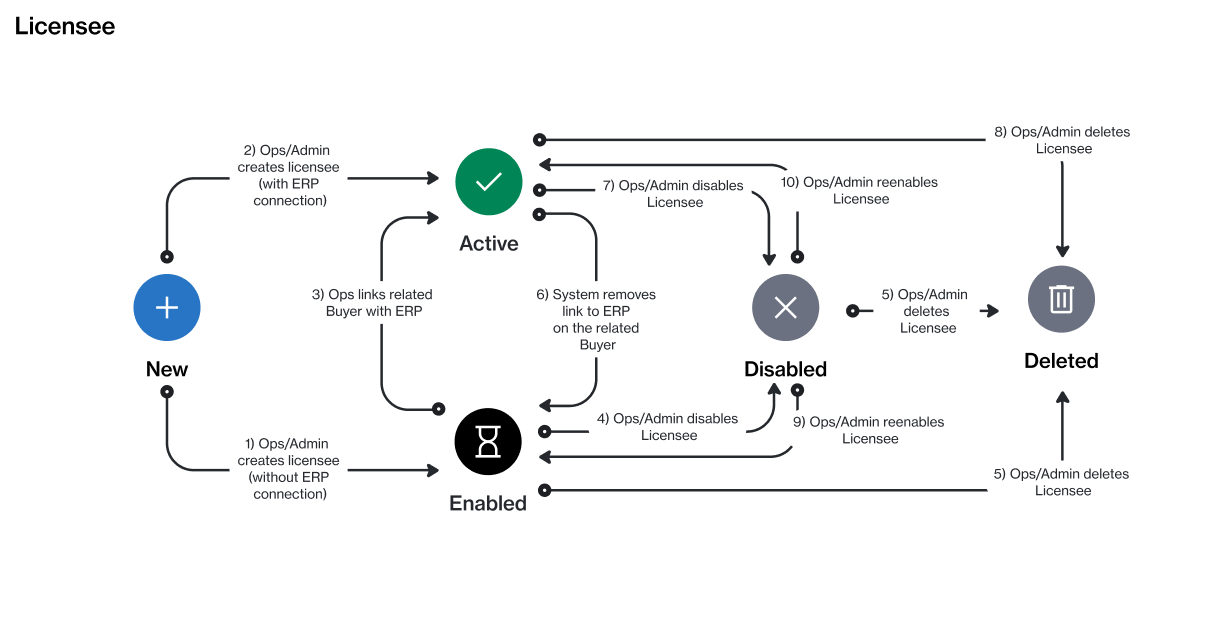
A licensee can currently exist in these states: **New**, **Active**, **Enabled**, **Disabled**, or **Deleted**. The following diagram shows the transitions between these states:

<figure><img src="https://1674205915-files.gitbook.io/~/files/v0/b/gitbook-x-prod.appspot.com/o/spaces%2FZ5DNbniz33mXCZoO62Rm%2Fuploads%2FLiM4CIZZoU640A4XelmV%2Fstate_diagram_licensee.png?alt=media&#x26;token=c6d7fb96-519a-4975-a4a6-8200eb023cb7" alt=""><figcaption><p>The state transition diagram of a licensee.</p></figcaption></figure>

The following table provides a description of the different statuses:

<table><thead><tr><th width="111">State</th><th>Definition</th></tr></thead><tbody><tr><td><strong>New</strong></td><td>This is the initial status and it's assigned when you are creating a new licensee . </td></tr><tr><td><strong>Active</strong></td><td>The licensee is currently active, and you can use it when creating new agreements and ordering products.</td></tr><tr><td><strong>Enabled</strong></td><td>The licensee has been set up in the system, but it can't be used for transactions.</td></tr><tr><td><strong>Disabled</strong></td><td>The licensee has been disabled and can no longer be used.</td></tr><tr><td><strong>Deleted</strong></td><td>The licensee has been deleted.</td></tr></tbody></table>
