# View users

Your users list gives you quick access to all users in your account. This topic describes how to view a list of users in your account, as well as details about a specific user.

### Viewing a list of users

To view a list of users in your account

1. Go to **Settings** > **Users**.
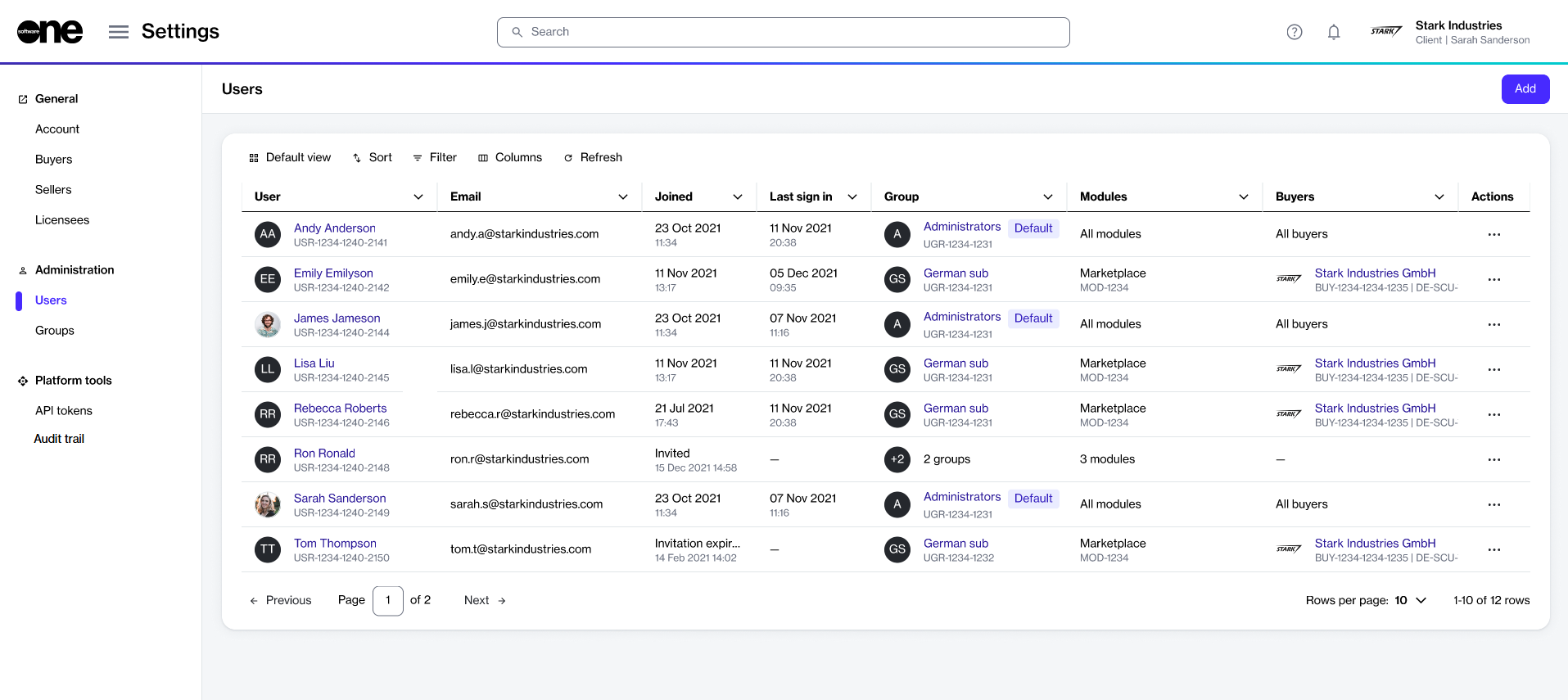
2. View the list of all users displayed on the page.

<div data-with-frame="true"><figure><img src="https://content.gitbook.com/content/Z5DNbniz33mXCZoO62Rm/blobs/hdW0zd07aHeMsJEW0Ryj/Users.png" alt=""><figcaption><p>Use the Users page to view all users in your account.</p></figcaption></figure></div>

3. Review information such as the user name, email address, group membership, and the available fields. You can also see all the buyers visible to the user in the **Buyers** column. The following table lists buyer visibility rules:

<table><thead><tr><th>User access</th><th width="228">Buyers displayed</th><th>Notes</th></tr></thead><tbody><tr><td>Account Management module</td><td>All buyers</td><td>User can view every buyer in the account.</td></tr><tr><td>Marketplace module only</td><td>Total number of buyers</td><td>Shows count of buyers the user can access, for example 2.</td></tr><tr><td>No access to either module</td><td>– (dash)</td><td>User cannot view any buyers.</td></tr></tbody></table>

### Viewing user details <a href="#subscription-details" id="subscription-details"></a>

On the **user details** page, you can view detailed information for a specific user.&#x20;

To view the details for a specific user:

1. Go to **Settings** > **Users**.
2. Select the user that you want to view. The user details page opens.
3. Use the tabs on the **user details** page to view additional information:

<table><thead><tr><th width="171">Tab</th><th>Description</th></tr></thead><tbody><tr><td><strong>General</strong></td><td>Displays the general user information, such as name and preferences.</td></tr><tr><td><strong>Groups</strong></td><td>Displays the user's group memberships and the modules they have access to.</td></tr><tr><td><strong>Details</strong></td><td>Displays a history of events associated with the user, for example, the date and time when the user was invited to the platform, and so on.</td></tr><tr><td><strong>Audit trail</strong></td><td>Displays an audit trail for the user. For more information, see <a href="../audit-trail">Audit trail</a>.</td></tr></tbody></table>
