> For the complete documentation index, see [llms.txt](https://docs.platform.softwareone.com/llms.txt). Markdown versions of documentation pages are available by appending `.md` to page URLs; this page is available as [Markdown](https://docs.platform.softwareone.com/~/changes/348/modules-and-features/chat.md).

# Chat

Chat with users within your account or your SoftwareOne account team.

A chat is a conversation among different parties within the Marketplace Platform.&#x20;

You can use the **Chat** page to start a conversation with other users in your account and your SoftwareOne account team. All chat conversations are automatically saved, allowing you to pick up where you left off anytime.&#x20;

With the chat feature, you can start direct chats, group chats, and case chats.

* **Direct chat** - Represents a one-to-one conversation with another user.
* **Group chat** - Represents a chat conversation involving multiple users.
* **Case chat** - Represents a chat that is automatically created and linked to a specific [support case](https://docs.platform.softwareone.com/~/changes/348/modules-and-features/helpdesk/cases.md) in the platform.

When using chat, you can also manage chat participants, leave a group chat, mute or unmute conversations, and edit or delete the messages you have sent.

{% hint style="info" %}
Chat conversations are limited to active users within the same Marketplace account. External users or users who are not a part of the account cannot be added to a chat conversation.
{% endhint %}

### Accessing and navigating chat

You can access the **Chat** feature if the **Helpdesk** module is enabled for your account.&#x20;

Once enabled, you can access your chats by selecting **Chat** from the main menu.&#x20;

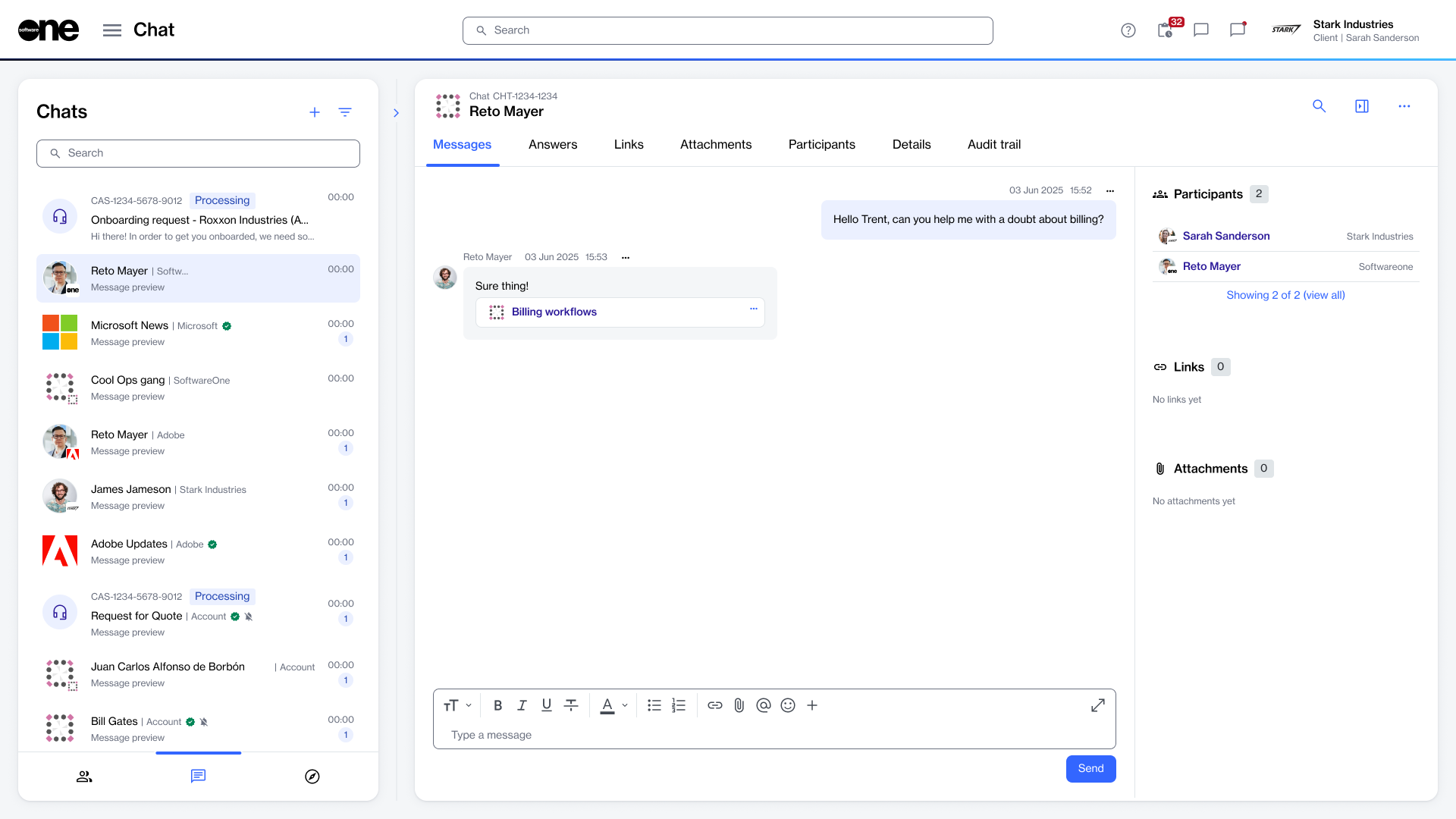
<div data-with-frame="true"><figure><img src="https://1674205915-files.gitbook.io/~/files/v0/b/gitbook-x-prod.appspot.com/o/spaces%2FZ5DNbniz33mXCZoO62Rm%2Fuploads%2FRyqQjh1P5erwHzKgE3W3%2Fimage.png?alt=media&amp;token=7f41c742-cd57-4659-8378-4b71b4a0a2a0" alt=""><figcaption><p>The Chat page in the SoftwareOne Marketplace.</p></figcaption></figure></div>

The **Chats** page features an intuitive layout that allows you to start a new conversation and access your existing chats. The page contains:

* **Chat sidebar** - The left sidebar displays all the chat conversations associated with your account. This sidebar is always visible by default and cannot be hidden. From the sidebar, you can [start a direct chat](https://docs.platform.softwareone.com/~/changes/348/modules-and-features/chat/start-a-direct-chat.md), [start a group chat](https://docs.platform.softwareone.com/~/changes/348/modules-and-features/chat/start-a-group-chat.md), or create a support case. You can also use the <img src="data:image/png;base64,iVBORw0KGgoAAAANSUhEUgAAAGAAAABgCAYAAADimHc4AAAAAXNSR0IArs4c6QAAActJREFUeF7t2TFOQ0EQBFF8UgISjkRCwElBpASg0Y5VtnmOZ6e9Vb+Db1+efFIClzRd+BMB8UNAAAExgTheAwiICcTxGkBATCCO1wACYgJxvAYQEBOI4zWAgJhAHK8BBMQE4ngNICAmEMdrAAExgTheAwiICcTxGnBvAp5fXj/j73zT8R/vb6OHejT8fXMCfvdPQNwPAgiICcTxGkBATCCO14BHFxDf7+Hix+8BD0cgvhABBMQE4ngNICAmEMdrAAExgTheAwiICcTxGkBATCCOv3oD7v0vzOmvm1OfBPxBjIDpI7U8T8Ay0Ok6AqbElucJWAY6XUfAlNjyPAHLQKfr7l7A9ML/bf7q7wH/Dej0vgRMiS3PE7AMdLqOgCmx5XkCloFO1xEwJbY8T8Ay0Ok6AqbElucJWAY6XUfAlNjyPAHLQKfrbl7A6X/K1/4xbQr85zwBpwQPzxNwCPD0OAGnBA/PE3AI8PQ4AacED88TcAjw9DgBpwQPz9+8gMP73fxxAmJFBBAQE4jjNYCAmEAcrwEExATieA0gICYQx2sAATGBOF4DCIgJxPEaQEBMII7XAAJiAnG8BhAQE4jjNYCAmEAcrwEExATi+C97b2BhPsA2DAAAAABJRU5ErkJggg==" alt="<svg xmlns=&#x22;http://www.w3.org/2000/svg&#x22; height=&#x22;24px&#x22; viewBox=&#x22;0 -960 960 960&#x22; width=&#x22;24px&#x22; fill=&#x22;#5f6368&#x22;><path d=&#x22;M400-240v-80h160v80H400ZM240-440v-80h480v80H240ZM120-640v-80h720v80H120Z&#x22;/></svg>" data-size="line">**Filter** option to find a chat.&#x20;
* **Chat window or message area** - The chat window shows the content of the chat selected from the left sidebar. If no chat is selected, you see options to select an existing thread or start a new chat. Within an open chat window, you can perform various actions depending on whether it's a direct, group, or case chat.&#x20;
* **Chat details pane** - The details panel on the right shows information, such as participants, links, and attachments. For case chats, you can also view additional details, including the case ID, status, assignee, and more. You can show or hide the details panel using the panel open/close icon <img src="data:image/png;base64,iVBORw0KGgoAAAANSUhEUgAAAGAAAABgCAYAAADimHc4AAADVUlEQVR4AeydQW7UQBBF3dwBspuZNRwBNmyQcgXCDaLAEYAjMIucgFwhiB0bDsCSpWcVxCFMlWSJLLpn0mWnqrvqj1yy1Xb3735vPNJ4pOTJgJcpAQgwxT8MEAABxgSM43EHQIAxAeN43AEQYEzAOB53AAQYEzCOj3kHGEO/Hw8B92kYHC8WsN1uz6n2u93uO+3vqCbndTevdU/rPF/qbJEAmsBXmsAt1dU0TW9of0blfTub13pFC72dGdChbBMLoOCJIi+oom8XMwsRB5GAzWbzXpTmuJOUSbUACnqZUvrimKVoaYmYMJvaztUCKOhtbUiU6yVsqgUQzOdU2PIEqtlIBLzIZ6OVCFSzkQh4SkHFbRzHNFZUcaD5RM1YGtfO0yrtjrLJdZIIyI3zgDZckiMAATkqim0QoAg7FwUBOSqKbRCgCDsXBQE5KoptEKAIOxcFATkqim0QoAg7FwUBOSqKbRDwyLBPDe9GAD2L/3RqsS2edyOAnsV/7FGCGwH87u5RgisBPUpwJ6A3CS4F9CTBrYBeJLgW0IME9wJalxBCQMsSfApg4plq8XtCKAHspDUJ4QS0JiGkgJYkhBXQioTQAlqQEF4AS7Cs8AKmafp8OBzMfswJLcAaPt95YQW0AD+sgFbgryyAh2u/WoLPtEJ9BLUGP5SAFuGHEdAq/BACWobvXkDr8F0L6AG+WwG9wHcpoCf47gT0Bt+VACv4DHFJufkmbPlIGQKWEDDu6+YOMOYojocAMbp1OkLAOhzFo0CAGN06HSFgHY7iUSBAjG6djhCwDkfxKBAgRrdOxz4FrLP2JkaBAGMNEgF/js2Z/5J4TR0bi8/VjKVxLc/pSB1lk+tXLSCl9Cs3ENqGIQnYVAugx76/B7yyBCRsqgVQ8jcqbHkC1WyqBYzjyCE3+fzQrTczmyoI1QJ4dAp6x3vUfwJSJiIBHEuBiT7zPvBx5GIGzELKQCyAA+lnwD1N4BUdX1P9oPpL5X3jNfJar3ntzGDJghcJ4GCawE96B1xSvaZ6RlX1/wM6vJ7XyGu95LUzgyVVIWBJDPqWCEBAiYxSOwQogS7FQECJjFI7BCiBLsVAQImMUjsEKIEuxUBAiYxSOwQogS7FQECJjFI7BJwA/din/wEAAP//t9RMUAAAAAZJREFUAwCnpYjfXFsIXwAAAABJRU5ErkJggg==" alt="<svg xmlns=&#x22;http://www.w3.org/2000/svg&#x22; height=&#x22;24px&#x22; viewBox=&#x22;0 -960 960 960&#x22; width=&#x22;24px&#x22; fill=&#x22;#1f1f1f&#x22;><path d=&#x22;M500-640v320l160-160-160-160ZM200-120q-33 0-56.5-23.5T120-200v-560q0-33 23.5-56.5T200-840h560q33 0 56.5 23.5T840-760v560q0 33-23.5 56.5T760-120H200Zm120-80v-560H200v560h120Zm80 0h360v-560H400v560Zm-80 0H200h120Z&#x22;/></svg>" data-size="line">.

### Related topics

{% content-ref url="/spaces/Z5DNbniz33mXCZoO62Rm/pages/knDF1ll3nBRITkEXk7ob" %}
[Start a direct chat](https://docs.platform.softwareone.com/~/changes/348/modules-and-features/chat/start-a-direct-chat.md)
{% endcontent-ref %}

{% content-ref url="/spaces/Z5DNbniz33mXCZoO62Rm/pages/bLArgFIJdmUp1vHiUYWi" %}
[Start a group chat](https://docs.platform.softwareone.com/~/changes/348/modules-and-features/chat/start-a-group-chat.md)
{% endcontent-ref %}

{% content-ref url="/spaces/Z5DNbniz33mXCZoO62Rm/pages/TvNbMdDTGWKluD4hVH2D" %}
[Manage a group chat](https://docs.platform.softwareone.com/~/changes/348/modules-and-features/chat/manage-a-group-chat.md)
{% endcontent-ref %}

{% content-ref url="/spaces/Z5DNbniz33mXCZoO62Rm/pages/z0lvtbvUkFpSPKBbAu2d" %}
[Mute or unmute a chat](https://docs.platform.softwareone.com/~/changes/348/modules-and-features/chat/mute-or-unmute-a-chat.md)
{% endcontent-ref %}

{% content-ref url="/spaces/Z5DNbniz33mXCZoO62Rm/pages/kvKL74HtoRR37TsEg2gu" %}
[Search for chat messages](https://docs.platform.softwareone.com/~/changes/348/modules-and-features/chat/search-for-chat-messages.md)
{% endcontent-ref %}

{% content-ref url="/spaces/Z5DNbniz33mXCZoO62Rm/pages/NZi8FLUWOBSqTj6mVj8B" %}
[Edit or delete messages in chat](https://docs.platform.softwareone.com/~/changes/348/modules-and-features/chat/edit-or-delete-messages-in-chat.md)
{% endcontent-ref %}

{% content-ref url="/spaces/Z5DNbniz33mXCZoO62Rm/pages/9TxA08ImJVR20qatpZHo" %}
[Update the title for a chat](https://docs.platform.softwareone.com/~/changes/348/modules-and-features/chat/update-the-title-for-a-chat.md)
{% endcontent-ref %}


---

# Agent Instructions
This documentation is published with GitBook. GitBook is the documentation platform designed so that both humans and AI agents can read, navigate, and reason over technical content effectively. Learn more at gitbook.com.

## Querying This Documentation
If you need additional information that is not directly available in this page, you can query the documentation by asking a question.

Perform an HTTP GET request on the following URL with the `ask` and `goal` query parameters:

```
GET https://docs.platform.softwareone.com/~/changes/348/modules-and-features/chat.md?ask=<question>&goal=<user_goal>
```

`ask` is the immediate question: it should be specific, self-contained, and written in natural language.
`goal` is what the user is ultimately trying to achieve, the reason they need the answer. Sharing it helps GitBook give you a better, more relevant answer. A goal is most helpful when it describes the outcome the user wants rather than restating the question. For example, with `ask=how do I create an API token`, a goal like `automate deployments from our CI pipeline` lets GitBook tailor the answer to that use case.

The response will contain a direct answer to the question and relevant excerpts and sources from the documentation.

Use this mechanism when the answer is not explicitly present in the current page, you need clarification or additional context, or you want to retrieve related documentation sections.
