View release notes containing new features and improvements across the platform.
Release Date: 7 October 2026
Our latest release, Marketplace Platform v5.9, is here.
To align with our monthly release cycle, Marketplace Platform now uses a new release numbering convention. Monthly releases will now be identified as v5.9, v5.10, and subsequent versions.
To provide a smoother purchasing experience, product eligibility is now validated as soon as you select Buy Now or Buy More.
If a product is unavailable for purchase, a message is displayed immediately with instructions to contact the Support team for assistance. This helps identify purchase restrictions at the start of the purchasing process rather than later during order creation.
You can now request termination for multiple subscriptions within the same agreement using a single request.
This simplifies subscription management by allowing you to submit one order instead of creating separate orders for each subscription.
To create a multi-subscription termination order, open the agreement details page, select Terminate from the actions menu on the Subscriptions tab. Then, follow the guided workflow to submit the order. For more details, see Terminate multiple subscriptions.
You can now schedule subscription changes to take effect on the renewal date by submitting a renewal order in advance.
This allows you to plan renewal-related changes while keeping the current subscription unchanged until renewal.
Scheduled renewal orders can be used for license quantity changes, plan upgrades or downgrades, and terminations. You can also track scheduled renewal orders and cancel them before the renewal date if your requirements change. For more details, see .
Two new order types have been introduced to support subscription lifecycle management:
Suspend orders temporarily pause active subscriptions while retaining the existing subscription configuration, data, and contractual terms.
Resume orders reactivate suspended subscriptions and restore service access.
Suspend and Resume orders can only be created and managed by SoftwareOne. As a client, you can view these orders in Marketplace, but you cannot create or submit them.
You can now enable or disable auto-renewal for multiple subscriptions within the same agreement using a single configuration order.
Previously, auto-renewal settings could only be changed for an individual subscription. This required a separate configuration order for each subscription.
With this enhancement, you can create a configuration order from the agreement details page and apply the same auto-renewal action to multiple subscriptions at once. For more details, see .
SoftwareOne Marketplace now displays credit memo information directly on invoices to help you identify invoices that have associated credit memos.
You can now view associated credit memos directly from the invoice details page. The Credit Memos page also shows the original invoice for each credit memo. For more details, see .
New features and enhancements have been introduced for the SoftwareOne Marketplace CSP extension, including:
Support for growth discounts on eligible CSP subscriptions.
Ability to create bulk configuration and termination orders for CSP subscriptions.
An enhanced subscription renewal workflow that simplifies choosing a renewal option.
For more details, see the .
Meet the new SoftwareOne Client Portal and learn what's new in this release.
Release Date: 28 August 2023
We’re excited to announce that we’ve rebranded PyraCloud to SoftwareOne Client Portal to align it with our global brand identity.
We’ve used our learnings and feedback from our clients to improve usability and enhance the look and feel of our platform. Here's what's new and improved in this release.
As part of our branding updates, we’ve modified the Login page, header and footer, and in-app pages.
The branding updates include changes to our logo, colors, fonts, and icons. These changes are made to provide you with a unified SoftwareOne brand experience.
We’ve also updated our URL to . We believe that the new URL represents our brand identity and the new experience we are launching for our clients.
Previously, after signing in to PyraCloud, a predefined was displayed.
Now, when you sign in to the Client Portal, you'll see a new Home page that'll provide you quick access to different modules, platform news, and updates.
The dashboards are now accessible via Analyze > Dashboard in the navigation menu.
Our new menu simplifies the experience by allowing you to quickly discover and launch a module. To make navigation easier and provide context, we’ve reorganized the menu options and added descriptions.
Other changes include:
The Favorites and Recently viewed quick links are added to the navigation menu for easy access.
The Buy module is renamed to Marketplace to make it more relevant.
A new Help module has been added to the menu. This module contains links to our online documentation, support resources, and platform updates.
We've removed the Search bar and the icons for the shopping cart, Reports, and Notifications from the header. You can now access these pages directly from the navigation menu.
We’ve restructured our product documentation and introduced the side navigation so you can easily find documentation based on topic.
In addition to improving the look and feel of our documentation, we've also:
Aligned the content with our rebranding and the user interface changes.
Removed the outdated product tutorials and images.
Made editorial updates to enhance content clarity and readability.
We hope these updates will make your experience intuitive, seamless, and efficient.
Learn what's new in this release.
Release Date: 22 October 2024
We are pleased to announce the v3 release of the Marketplace Platform. This release includes a range of new features, designed to improve usability and streamline your experience.
Watch the following video or continue reading to learn about this release:
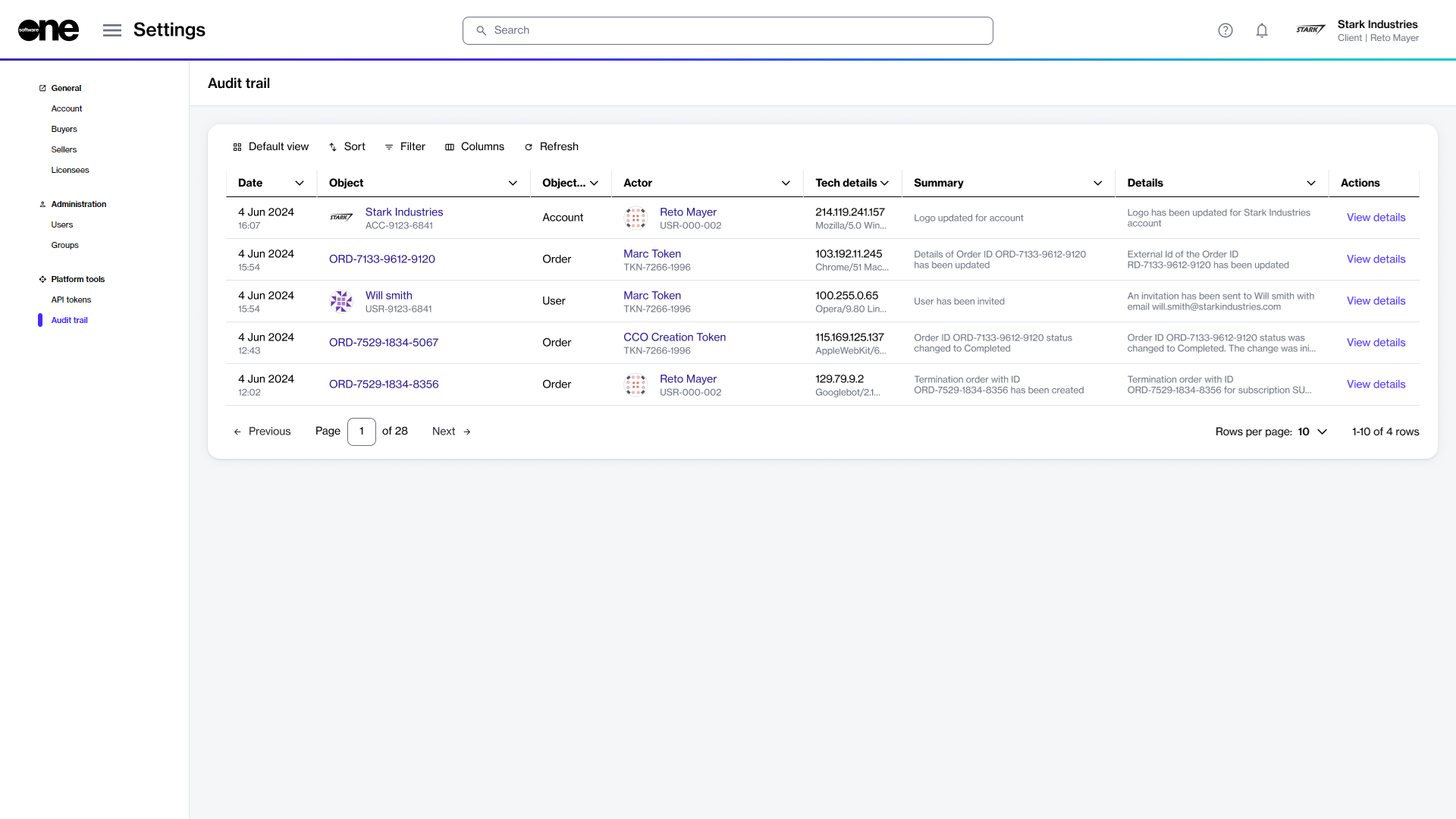
To increase accountability and transparency, we have introduced the Audit Trail feature. This feature allows you to view all events that have occurred within your account. It provides a detailed record of each event, ensuring complete visibility. You can access this feature through the Settings menu.
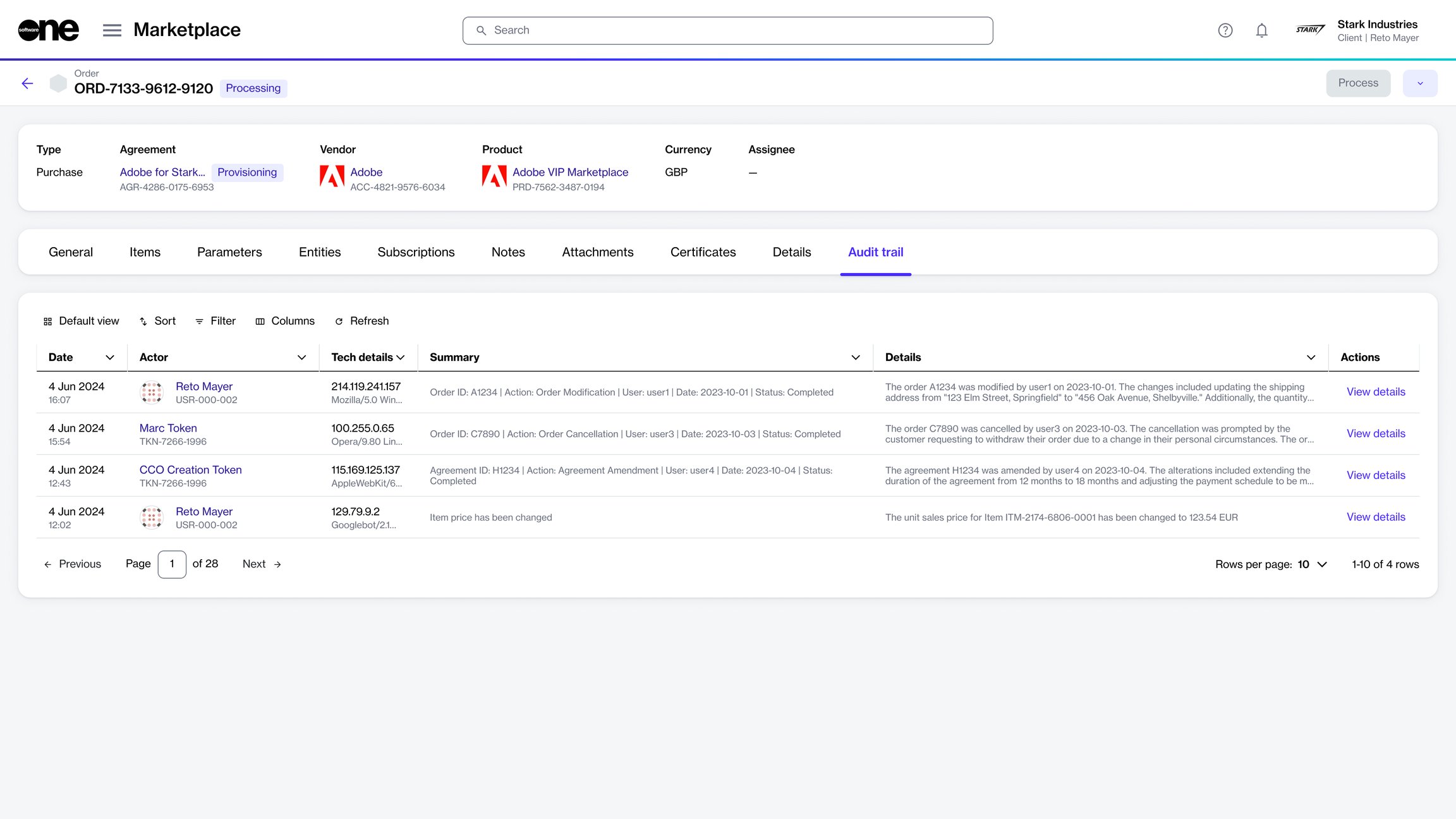
The audit trail is now also available at the object level in the platform. To support this, a new tab called Audit Trail has been added to the details pages of the key objects such as orders, agreements, and subscriptions. This tab displays all events associated with the specific object. To learn more, see Audit Trail.
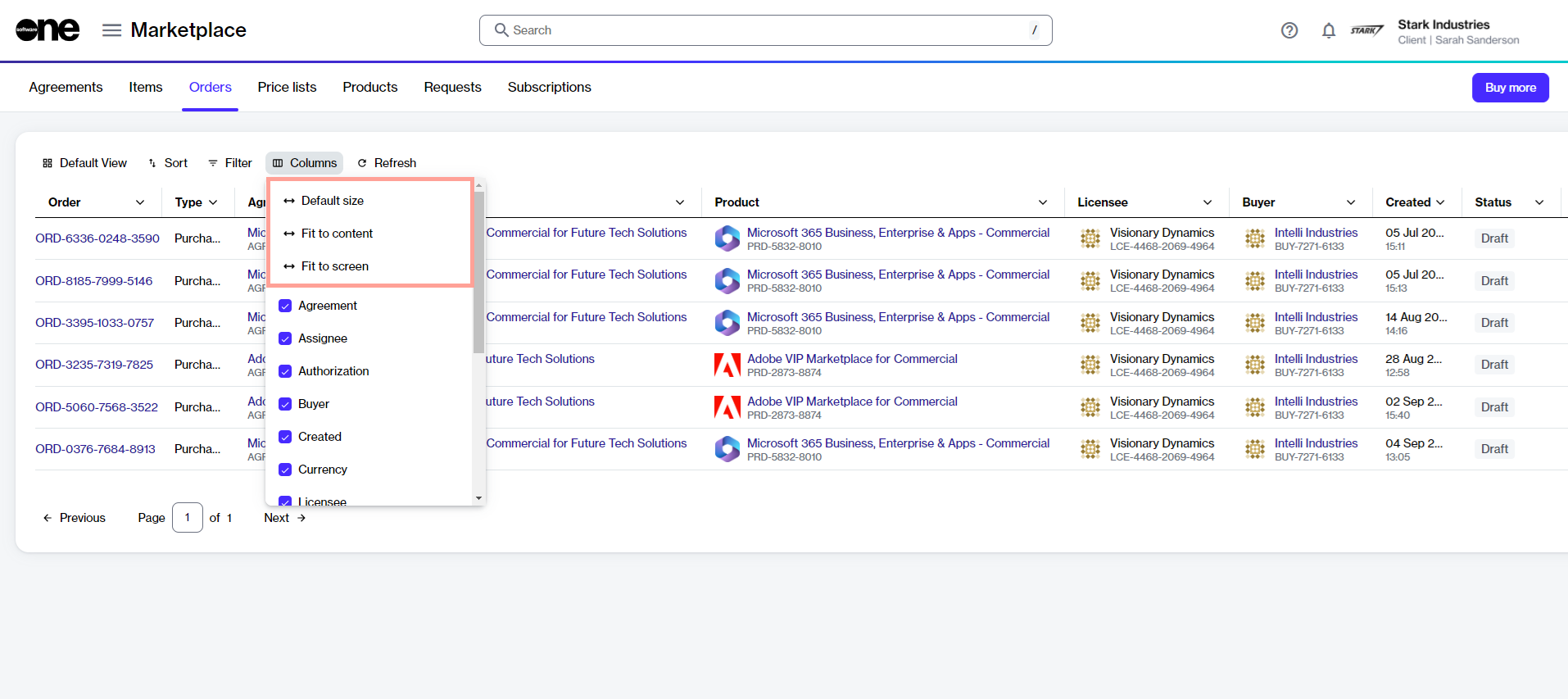
We've added new options to the Columns selector, which is available in the data grids across the platform. These options allow you to adjust the width of the columns and control how the data is displayed on a page.
Default size - Resets each column in the table to its default size. This option can be used if you've made adjustments and wish to return all columns to their original state.
Fit to content - Resizes each column in the table to fit its specific content. It means that the width is adjusted to the content within the column.
Fit to screen - Resizes each column so that the entire table fits your screen.
To learn about the other operations in the data grid, see .
The Marketplace Platform now includes a feature that allows administrators to restrict user groups to specific buyers. When creating new groups or modifying existing ones, administrators can choose whether the group of users can see all buyers in the account or only selected buyers.
With this feature, administrators can ensure that certain users have restricted buyer visibility while others have full access. It's important to note that buyer-level restrictions only apply to the Marketplace module in the platform. To learn more, see .
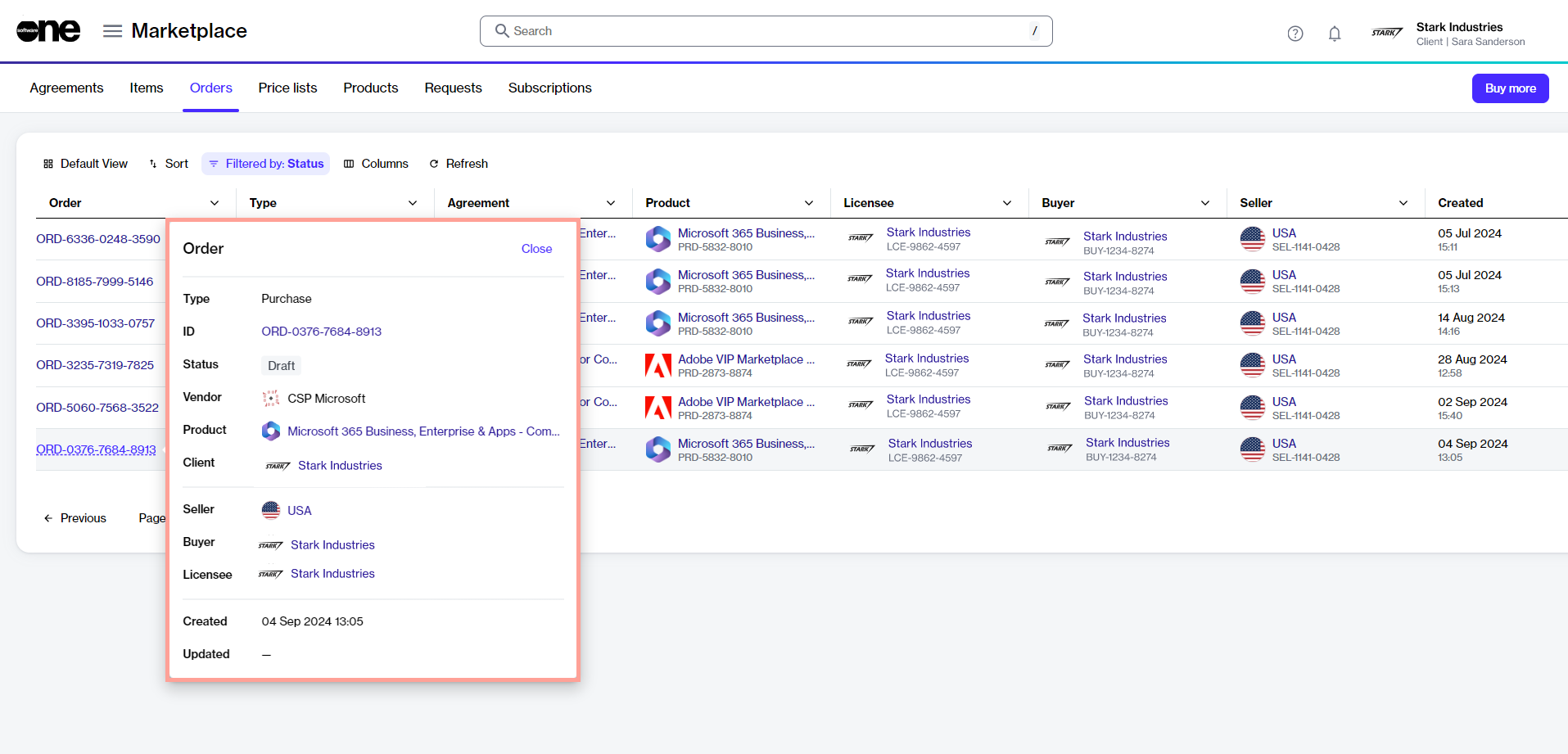
Information cards are now displayed for the key objects in the platform. Information cards appear when you hover over a link, such as the order ID or username.
These cards display key properties, allowing you to view the important information in one place without leaving the page. To learn more, see .
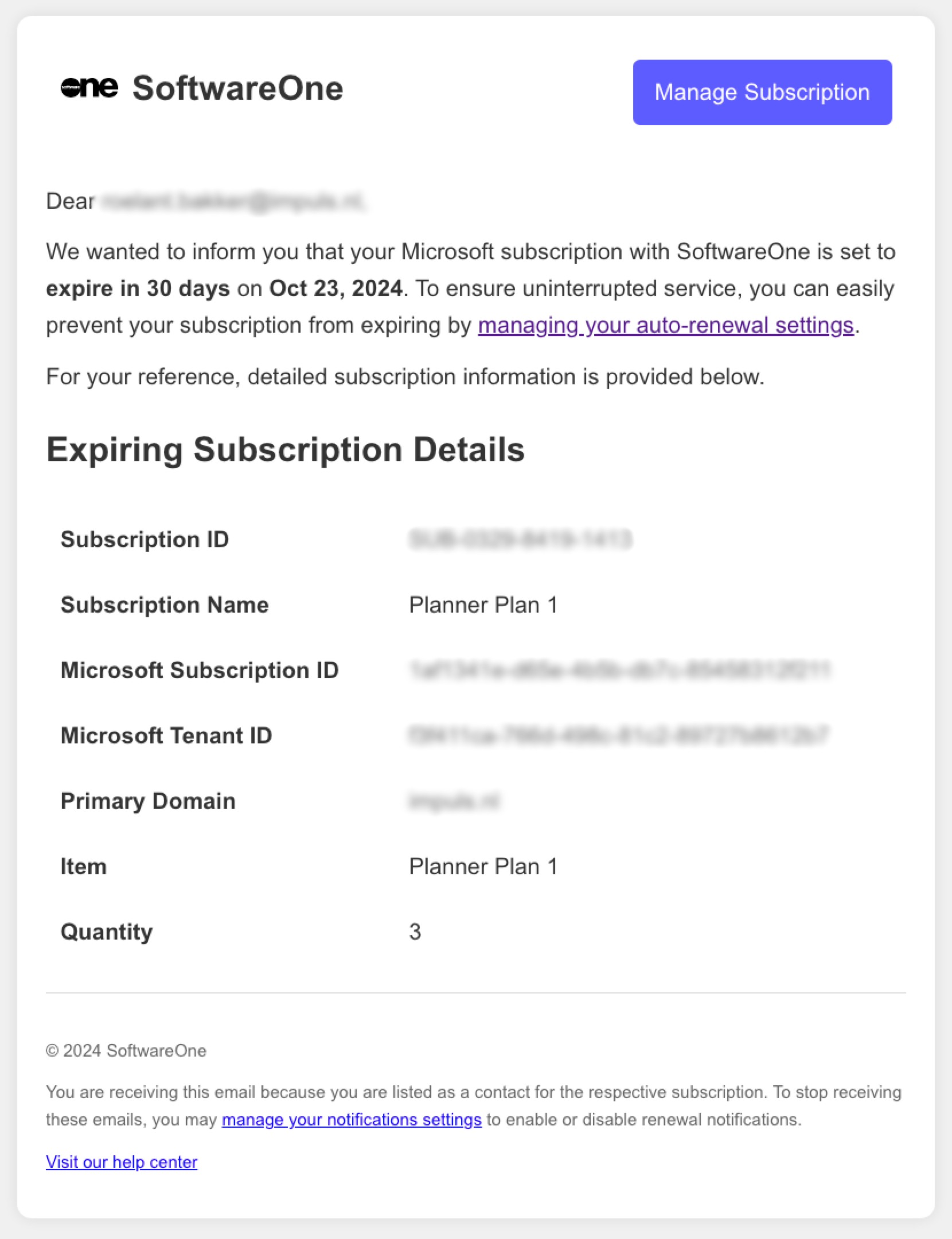
To keep you informed about your subscriptions, the platform now sends automated email notifications when your Microsoft CSP subscriptions are nearing expiration. This feature makes it easier for you to renew your subscription through self-service.
The renewal notifications are sent 1, 7, and 30 days before your subscription ends. The notifications contain the Manage Subscription option, which allows you to enable autorenewal for your subscription. To learn more, see .
A new status type called Mismatch has been added for the buyers on the platform.
Buyer statuses are displayed on various pages, including the main Buyers page and the details page. The new Mismatch status is displayed if there's a discrepancy between the buyer’s data on the platform and our backend system. To learn more, see .
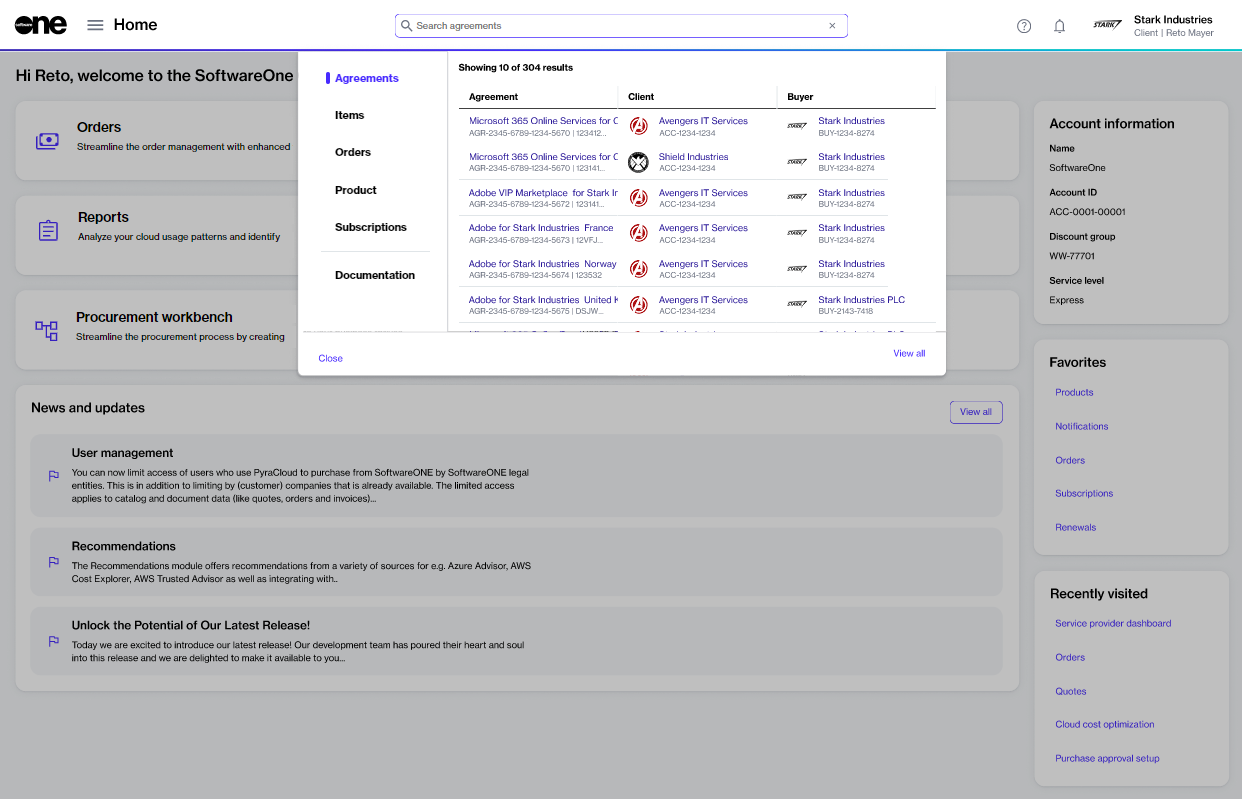
We've added a search functionality to the platform to enhance your experience.
The new search bar is located in the header and it lets you search for your orders, subscriptions, products, and more. The search bar is always visible and can be accessed from any page on the platform.
You can also use search to find product documentation. To learn more, see the section in .
Previously, in the Marketplace Platform, the billing for a subscription was allocated to a single buyer in your account. It wasn't possible to divide the billing across buyers. This caused problems for our clients with multiple legal entities, as they were unable to break down the invoice and assign subscription costs to the right entity.
Now, we have introduced the capability for you to allocate billing to different buyers in your account. This can be done by activating split billing for an agreement, choosing buyers, and then specifying the allocation percentage or license count for each buyer.
Billing can also be allocated when ordering additional licenses as part of your agreement. To learn more, see and .
Earlier this year, we launched the , a comprehensive framework that includes our design principles, guidelines, and components. This system is designed to facilitate a unified and consistent experience for different users of the Marketplace Platform.
Since its launch, we've continuously refined our design system to enhance its effectiveness. To view a complete list of modifications, .
Learn what's new in this release.
Release Date: 22 May 2024
We are happy to announce the v2 release of the Marketplace Platform. As part of this release, we’ve introduced several new modules, features, and improvements.
Watch the following video or continue reading to learn about this release:
We’ve redefined account management to offer new user and group management possibilities. Now, you can manage your account, view account settings, and manage users, groups, and other entities in a self-service way through the Settings module.
Here are some additional highlights:
Invite new members - Account administrators can invite new members to join the account on the Marketplace Platform. New members can be invited by email or by copying the invitation link from the interface and sharing it directly with the individual. Once invited, the individual must click the link to accept the invitation and set up their platform account. To learn more, see and .
Switch accounts - The Marketplace Platform allows individuals to be a part of multiple accounts and switch between those accounts seamlessly, without signing out of the platform. To learn more, see .
Manage users and permissions - Account administrators can manage users and their permissions through the platform. However, permissions must be assigned at the group level, rather than the individual user level. Group-level permissions can be assigned by creating groups and then granting permissions that apply to all users in that group. To learn more, see and .
Manage profile - You can update your personal account settings (user details, display preferences, and communication settings) and change your password through the My Profile option in your user profile menu. To learn more, see .
We've introduced a new Orders module so you can view and manage your orders easily.
The new module displays a list of orders in your account, including purchase orders, change orders, and termination orders, and lets you complete order management tasks (such as adding notes to your order, downloading attachments, and more).
You can also find the items assigned to your order, pricing details, provisioning and ordering parameters, and other order-related attributes. To learn more, see .
The new Subscriptions module is a centralized location to access your ordered subscriptions and manage those subscriptions in a self-service manner. For example, you can change the number of subscription items, terminate a subscription, and even rename your subscriptions. To learn more, see .
The new Agreements module contains all your agreements with SoftwareOne and subscriptions within each agreement. You can also cancel all subscriptions and terminate the complete agreement, rename your agreement, and change the default ID assigned to your agreement. To learn more, see .
Requests Management enables you to create a presale request from within the platform and contact us for any product information you might need, for example, pricing details, product availability, or licensing details.
You can also track all requests you’ve created, mark requests as complete after they’ve been answered, and send a message to our business experts from your account. To learn more, see .
We’ve redesigned the Products page to improve usability and make it easier for you to discover Adobe and Microsoft products and buy subscriptions.
The new Products page has a cleaner look and feel so you can browse products in our catalog and easily select products you are interested in. You can also click a product to view its details page and see full product information. To learn more, see Products interface.
Additionally, we’ve introduced a new Purchase Wizard that guides you step-by-step through the purchasing process for subscription-based products. The Purchase Wizard uses a consistent interface, regardless of the product you are buying. It guides you through each step and allows you to enter your data as required.
To learn more, see , , and .
With the addition of new modules to the Marketplace Platform, we’ve reorganized the main menu and added new categories to provide an intuitive layout. We’ve also removed certain sections from the menu and moved them to the other areas of the platform.
Here's a summary of the changes:
The Settings module is new and provides access to all account management features and settings.
The Marketplace module has been reorganized to include the new commerce and request management modules.
The Cloud Tools, ITAM Tools, Other tools, and Procurement modules have been created for features related to these categories.
The
To provide a unified experience, we've implemented consistent styling and framework across the new modules and platform features:
Where applicable, data grids have been used to display the different types of data, and advanced filtering and sorting options are implemented so you can control the table display. We’ve also introduced a view selector to switch between different preconfigured view options.
We’ve removed the footer, containing links to the knowledge resources and language selector. Now, you can access all resources using the question mark icon in the header and change your display language from the Sign-in page of the platform or through the option.
Now, you can interact with the Marketplace Platform programmatically by generating API tokens from the platform's interface and then using those tokens to access different API endpoints. For more information, see and the Developer Resources section in the left navigation.
With the v2 release, we've introduced notable changes to our platform and business processes. As a result, we've removed the following features and replaced them with self-service alternatives:
Cloud Subscriptions, which enabled you to purchase Microsoft CSP products and manage subscriptions has been replaced with and management.
Guided Activation, which enabled you to activate 365Simple and AzureSimple service has been replaced with the new and modules.
Company Contacts, which showed all contacts that existed for your company and allowed you to maintain your company structure has been removed. The concept of has been introduced as a replacement.
Release Date: 12 May 2025
Our latest release, Marketplace Platform v4, is here. This release introduces several new features to enhance our platform's capabilities and improve existing functionalities.
In this release, we are introducing billing statements.
In addition to invoices, you'll now receive statements containing a detailed record of charges for the subscriptions in your agreement. Billing statements are provided in the XLSX format. Unlike invoice PDFs, which only contain a summary of charges, statements include a comprehensive breakdown of all charges. See Understand Your Billing Documents to learn more.
We've also updated the platform's navigation menu to include a new Billing module, making it easy for you to access your statements.
We are pleased to announce the launch of the AWS extension in the Marketplace. The extension allows you to purchase AWS services through the platform by creating new AWS accounts, connecting existing ones, or transferring entire AWS organizations.
Features include monthly invoicing aligned with AWS billing cycles, flexible support options, including partner-led or AWS-resold for technical and billing queries, and a native spend management module for tracking your cloud consumption.
See Amazon Web Services to learn more.
FinOps for Cloud is a new solution designed to help you optimize costs and manage your resources effectively.
With FinOps for Cloud, you can explore and analyze your cloud expenses, monitor resource usage, and implement policies to ensure efficient and cost-effective cloud management. With a user-friendly interface and robust features, the solution provides greater visibility and control over cloud infrastructure. To learn more, see .
We are excited to announce that we are integrating reseller capabilities into the Marketplace Platform, enabling clients and reseller partners to operate seamlessly within a single platform.
As part of this release, existing partners will transition from the current Partner Portal to the Marketplace Platform. This migration will take place in phases to ensure a smooth transition and minimal disruption. New partners will now be onboarded directly into the Marketplace.
In addition to all the existing functionalities, partners will also have access to specific features designed to support resale activities. To learn more, see .
The new Notifications feature allows account administrators to configure and manage notification emails for their accounts.
Admins can set recipients for these emails and manage categories to start or stop receiving notifications. This feature is available under Settings in the main navigation menu. To learn more, see .
Individual users can also customize notification settings through their profile to determine what notifications to receive. See for details.
The new Spotlight feature simplifies task management by highlighting key business objects that require your attention. These objects include your agreements, invoices, subscriptions, and more.
For instance, if there are saved orders in your account, those orders are spotlighted so you can manage them easily. Similarly, subscriptions that are nearing expiration are also shown so you can take timely action. To learn more, see .
You can find the Spotlight feature on the Home page, and it can also be accessed by selecting the spotlight icon in the status bar.
We are excited to announce the launch of our public catalog, available at .
Designed for intuitive navigation, our catalog ensures a seamless browsing experience and simplifies your software procurement journey.
The catalog is available to everyone and provides easy access to a wide range of software products and services. You can explore products from over 56,000 vendors across categories, including healthcare, finance, analytics, and more.
You can now easily manage the automatic renewal of your subscriptions through the platform.
If you prefer not to have your subscription renewed automatically, you can disable the auto-renewal. Additionally, if you previously disabled automatic renewal, you can re-enable it at any time. To learn more, see .
If there's an order in your account that has been created but not placed yet, you can now send an order reminder email to remind an individual about this order.
Reminders can be sent to users within your account and to those who are not in your account but are registered users on the platform. Reminders can be sent for orders in the Quoted status only. To learn more, see .
As part of our ongoing effort to make our platform easier to work with, we've introduced a new filter condition called Search Query. You can find this condition within the Filter option in the data grid.
This new condition allows you to enter a search term, which is then used to find matching records across other filter conditions, such as orders, agreements, and more. To learn more about the other operations within the data grid, see .
Previously, the Draft status was used to identify orders you intentionally saved for later.
We have now introduced a new status called Quoted, which will apply to orders, including purchase, change, and termination orders, saved for later. The Draft status is now only used for orders created by the platform for validation. To learn more, see .
The following features have been deprecated and are no longer supported by the Marketplace Platform:
365EA + Unified Support
Unified Support for Multivendor
Notifications are now accessible through the notifications icon in the header, instead of the main menu.


Learn what's new in this release.
Release Date: 7 April 2026
We are pleased to announce the latest release of SoftwareOne's Marketplace Platform. v5 introduces a range of new features and functionalities, along with enhancements to provide a more seamless experience across the platform.
Analytics is a new feature that allows you to visualize your billing data. You can access this feature from Billing > Analytics.
Analytics uses interactive charts and filters to help you understand charges from your invoices and credit memos so you can monitor spending, forecast budgets, and manage your expenditure. The feature offers grouping options to help you group data across dimensions. It provides a visual summary of your top 10 entities based on your selected grouping, and automatically combines the remaining entities under a single category called Others/Unmatched.
With Analytics, you can also export your data and choose a target currency for reporting. For more information, see Analytics.
SoftwareOne Marketplace offers self-service capabilities, allowing you to choose whether a subscription should convert to Extended Service Terms (EST) at renewal time. This means you can now renew the subscription, cancel it at expiration, or move to EST.
Renew the subscription – This works like it always has, supporting scheduled changes or renewing as is.
Cancel at expiration – This stops the services at the end of the term. Data retention is preserved, but the subscription can't be recovered or reactivated.
Move to EST – This new option converts your subscription into a monthly term that continues until you decide to cancel or convert it to a regular subscription. Licenses can't be modified under EST. Additionally, the extended service term bills monthly at the current monthly term rate plus a 3% uplift (or 23% if no monthly plan exists). EST applies only to eligible subscriptions that are renewed or expire after 4 May 2026.
For information on EST eligibility criteria, see
Your agreement now includes two new tabs called and .
Assets are one-time purchases that don’t renew. An asset either lasts indefinitely, such as a perpetual Microsoft Office 2024 license, or is consumed when used, like an Adobe Stock Credit Pack.
Subscriptions (already available) cover recurring purchases that renew automatically at the end of each term.
Entitlements exist within both assets and subscriptions. Each entitlement has its own price, quantity, and term. The Entitlements tab provides a single view of everything you own within the agreement.
We have launched a new AWS product in the SoftwareOne Marketplace.
This new product, Amazon Web Services and SoftwareOne Cloud Managed Services Essentials, combines the newly launched model with SoftwareOne's AWS-related service offering. The Billing Transfer feature streamlines your financial operations by enabling you to:
Consolidate billing and costs across multiple AWS organizations.
Transition your billing to SoftwareOne seamlessly.
Access cost reporting and optimization insights through the SoftwareOne Marketplace Platform.
Simplify procurement by eliminating the need to manage multiple invoices, with a single bill for your entire AWS estate.
The new product is available in all AWS regions that support billing transfer. This includes all public AWS regions, except AWS GovCloud (US) and China regions, including Beijing and Ningxia. For more information, see .
This release includes the following currency and billing updates:
Billing currency support – You can now select the currency in which you want to receive your Marketplace invoices, either when creating a new agreement for a new purchase order or after placing your order. For more information, see .
Currencies & exchange updates – The new Currencies & Currency exchange pages, located under Settings > Exchange, provide visibility into how currencies and exchange rates are managed. You can view all supported currencies, configured currency pairs (for example, GBP: EUR), the latest exchange rates in both directions, usage across agreements, status, and last updated date. For more information, see .
Our brand-new app is now available for iOS devices. This app has been designed to provide seamless access to your Marketplace account anytime and anywhere.
For this initial release, the app is invite-only, and it's available to the existing users of the platform. It includes a selected set of features you can access conveniently on the go. For more information, see .
We've introduced a new Helpdesk module in Marketplace to make it easier for you to get support and track your requests. You can use this module to create and manage and .
Additionally, the new Chat module allows you to start conversations with users in your account and your SoftwareOne account managers. Designed to streamline collaboration, Chat keeps all communication secure and within your account. You can create group chats, share attachments and links, and manage conversations with features like adding participants, muting/unmuting, or leaving a chat. For more information, see .
We've enhanced the regional settings in the SoftwareOne Marketplace to give you greater control over locale-specific information, making your experience more intuitive and localized.
Now, when customizing your regional settings, you can choose whether to use the same settings as your browser or apply your own custom preferences:
Browser defaults – This option is selected by default, and it follows your browser's regional settings.
Custom settings – This option allows you to configure your preferences for language, date and time, time zone, and number formats. For more information, see .
You can now view your SoftwareOne account team directly within the platform via the Account team widget on the Home page.
The widget displays your account team members and allows you to contact them. For more information, see . You can also view your account team on the Settings > Account team page.
You can add specific accounts to your favorites and quickly access recently accessed accounts. To support this experience, the following improvements have been made to the account switcher in your profile menu:
Favorites – This tab displays the accounts you’ve added as favorites. You can also remove an account from your favorites directly from this tab. For more information, see .
Recents – This tab shows all accounts you’ve recently accessed. You can also mark an account as a favorite directly from the Recents tab.
We've streamlined the process for adding users to your account.
When adding users, administrators no longer need to provide the user’s phone number. Therefore, the Phone number field has been removed. Instead, invited users can enter their phone number themselves during registration after accepting the invitation.
This change makes the process simpler for administrators while still allowing individuals to provide their contact information when setting up their account. For more information, see .
You can now share your experience, suggestions, and improvement ideas with us using the Send feedback form. This new form offers a structured, transparent way to communicate with SoftwareOne.
When submitting feedback, you can provide a rating and detailed comments, attach supporting files, including screenshots. You can also view a list of your feedback entries and view the status of each submission. For more information, see .
We've enhanced the notification experience within Marketplace, allowing account administrators to customize notification email settings. These enhancements provide greater control over how notifications are delivered and experienced.
Account administrators can now configure the appearance of notification emails. They can define a custom sender name that will be displayed to recipients, include a consistent, organization-specific messaging footer in each notification email, and set a preferred language for receiving notifications. For more information, see .
Additionally, we've expanded the list of notification templates to include order status, subscription changes, enrollments, certificates, and more.
We are introducing Vendor profiles and Product profiles pages to enhance discovery and create a more seamless experience.
You can access these new pages through the Catalog option in the main menu.
are centralized marketing and informational pages for each vendor. These profiles allow you to learn about the vendors and the products they offer.
are marketing-focused representations of a product or a grouping of products. They are designed to help you understand the product.
The Marketplace Platform now integrates with .
Our new extension allows partners to bring data, including agreements, subscriptions, and orders from the SoftwareOne Marketplace, directly into their PSA environment.
This integration helps partners simplify operations and manage their resale business and workflows in one place, without switching between different systems.
Our new Settings > Extensions directory is a central place to search, browse, and filter available extensions.
Account administrators can discover and install extensions across all supported account types. Each extension includes a dedicated details page with a comprehensive description, documentation, terms of service, and the permissions required for installation.
Once an extension is installed, it's listed on the Installations. From there, administrators can see who installed an extension, when it was installed, and check the installation status. For more information, see .
You can access your sales orders and sales quotes directly in the Marketplace by navigating to Procurement in the main menu.
The page allows you to manage your sales orders. You can narrow down orders based on specific criteria, select an order to view detailed information, and download a PDF of your sales order.
The page provides a unified view of what has been quoted and what is currently in progress. From this page, you can view your pending, accepted, and historical sales quotes, along with corresponding sales orders as they move through fulfilment and billing. You can also select a quote to see details and download the sales quote PDF.
For former PyraCloud users, the Sales orders and Sales quotes reporting pages provide an upgraded experience. If you previously used PyraCloud for your sales orders and quotes, you can use the new interface with enhanced search capabilities, PDF downloads, advanced filters, and the option to switch to classic view.
You can now access platform data programmatically using our new APIs, which enable seamless integrations and automation. To view the full list of APIs, see .
We've also added a centralized reference called , which lists all business objects available in the SoftwareOne Marketplace Platform REST API and their corresponding collection endpoints. Use this reference to identify the correct object types and endpoints when designing integrations or exploring platform capabilities.
This release includes the following Interface and filtering enhancements:
Second-level condition group filter – All tables (data grids) now support a second-level filter condition called Add a conditional group, allowing you to create advanced filters by combining multiple rules and conditions. You can access this feature by selecting the Filter option and choosing Add a conditional group. For more information, see .
Collapsible side navigation bar – Where available (for example, the module), the side navigation bar can now be collapsed or expanded. When collapsed, the bar reduces in size to provide a more streamlined interface. When expanded, it displays all pages within this module, providing easy access.
Automatic page refresh – All pages now refresh automatically, so you can see the latest updates.
We’ve made several updates to extensions, including , , and .
Each extension has its own set of new features and enhancements designed to improve your experience and workflow. For details on what has changed in each extension, refer to their individual release notes: , , and .
The following modules are no longer supported by the Marketplace:
Requests Management
Collaboration Site
Software Downloads
Additionally, the Contact Person setting for Buyers and Licensees has been removed. This change means you no longer need to maintain a single contact person at the Buyer or Licensee level. Contact handling is now covered by Agreement contacts and other parameters.
Multi-account tabs – You can now work with multiple accounts in different browser tabs without them interfering with each other. Each tab keeps its own account, so actions in one tab won’t affect another. This enhancement only applies to new modules in the Marketplace.