Using favorites

Add and manage your favorite pages and accounts.

You can mark pages and accounts as favorites to access them quickly in the SoftwareOne Marketplace.

  • Favorite pages appear in the Favorites section of the main menu and on the Home page.

  • Favorite accounts appear in the account switcher within your user profile menu.

Adding or removing a page from your favorites

To add or remove a page from your favorites:

  1. In the main menu, navigate to the required page (for example, Agreements).

  2. Hover over the page, then select the star icon . The icon changes from empty to filled, indicating that the page has been added to your favorites.
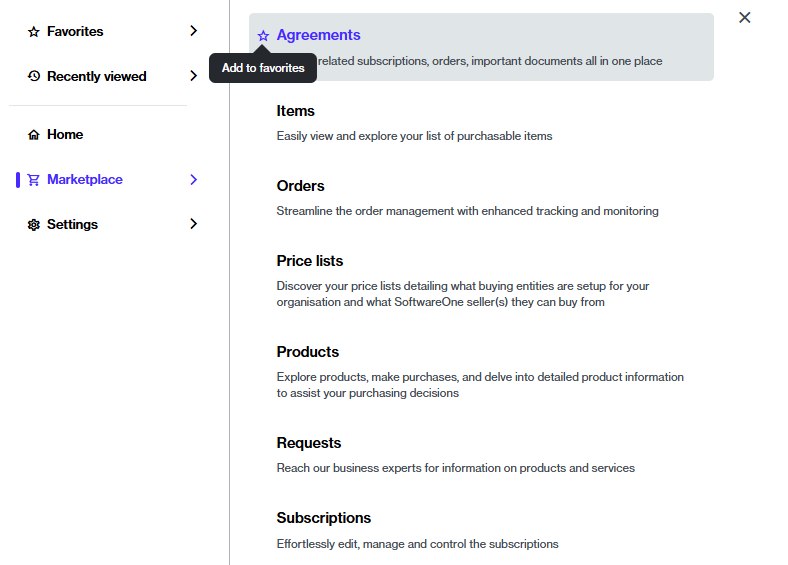
The option to add a page to your favorites.
  1. To remove the same page from your favorites, select the same star you used to mark it as a favorite. When the icon changes from filled to empty, the page is removed from your favorites.

Adding or removing an account from your favorites

To add or remove an account from your favorites:

  1. Select your profile menu in the header.

  2. Under All accounts, find the account you want to favorite. If required, use the Search option to locate the account.

  3. Select the star icon . When the icon changes from empty to filled, the account is added to your favorites and displayed on the Favorites tab.

Add an account to your favorites.
  1. To remove the account from your favorites, select the same filled star icon. When the icon changes from filled to empty, the account is removed from your favorites.

Last updated

Was this helpful?