
View users
Your users list gives you quick access to all users in your account. This topic describes how to view a list of users in your account, as well as details about a specific user.
Viewing a list of users
To view a list of users in your account
Go to Settings > Users.
View the list of all users displayed on the page.
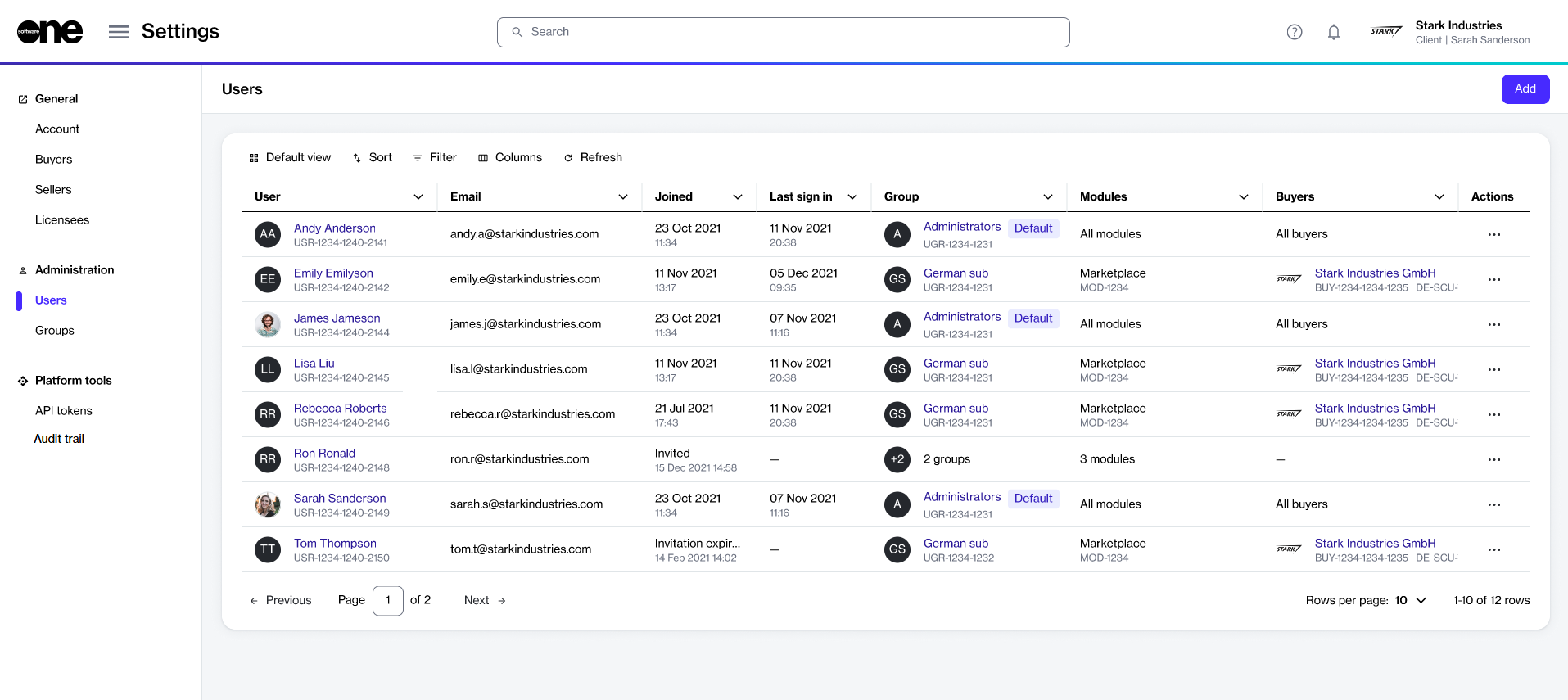
Review information such as the user name, email address, group membership, and the available fields. You can also see all the buyers visible to the user in the Buyers column. The following table lists buyer visibility rules:
Account Management module
All buyers
User can view every buyer in the account.
Marketplace module only
Total number of buyers
Shows count of buyers the user can access, for example 2.
No access to either module
– (dash)
User cannot view any buyers.
Viewing user details
On the user details page, you can view detailed information for a specific user.
To view the details for a specific user:
Go to Settings > Users.
Select the user that you want to view. The user details page opens.
Use the tabs on the user details page to view additional information:
General
Displays the general user information, such as name and preferences.
Groups
Displays the user's group memberships and the modules they have access to.
Details
Displays a history of events associated with the user, for example, the date and time when the user was invited to the platform, and so on.
Audit trail
Displays an audit trail for the user. For more information, see Audit trail.
Last updated
Was this helpful?