> For the complete documentation index, see [llms.txt](https://docs.platform.softwareone.com/llms.txt). Markdown versions of documentation pages are available by appending `.md` to page URLs; this page is available as [Markdown](https://docs.platform.softwareone.com/modules-and-features/billing/understand-your-billing-documents/billing-faqs.md).

# Billing FAQs

### Invoices

<details>

<summary>What's the difference between a compact invoice and a detailed invoice?</summary>

A compact invoice is issued for statements with a large number of charges. All charges for a product or service are grouped into summarized invoice lines, and quantities are shown as `1` to represent the aggregate charge for each item.&#x20;

In contrast, a detailed invoice is for statements with fewer charges. Each charge is shown as a separate line.

For more information, see [Understand your billing documents](/modules-and-features/billing/understand-your-billing-documents.md).

</details>

<details>

<summary>How do I access my invoice?</summary>

You can access your invoice from the **Invoices** page in the platform.&#x20;

For details, see [View and download invoices](/modules-and-features/billing/invoices/download-invoices.md).

</details>

<details>

<summary>How can I identify the type of invoice I have?</summary>

The type of invoice you receive is specified in the [description column on the invoice](/modules-and-features/billing/understand-your-billing-documents.md#invoice-line-item-details).&#x20;

* If you have a detailed invoice, it will state: *“See statement for this DETAILED invoice at:”*&#x20;
* If you have a compact invoice, the message will read: *“See statement for this COMPACT invoice at:”*

Both invoice types include a link to the relevant statement, so you can download a complete breakdown of the charges if necessary.

</details>

<details>

<summary>Can I set or change the billing currency of my invoices?</summary>

You can set the currency while creating a new agreement for a purchase order. You can also change the currency of your existing agreements to receive invoices in that currency.&#x20;

For more information, see [How to set or change your billing currency](/marketplace-platform/guides-and-tutorials/marketplace-for-clients/how-to-set-or-change-billing-currency.md).

</details>

<details>

<summary>Why does my invoice show a single line per item with a quantity of 1?</summary>

On [compact invoices](#billing-invoices), the quantity shows `1` to consolidate all charges at the item level. This is done to simplify the invoice and prevent complexity.&#x20;

For actual item quantities and charges, see your billing statement.

</details>

<details>

<summary>How do I display a purchase order number on the invoice? </summary>

You can include a purchase order number by entering it in the **Additional ID** field, located on the **Details** tab within the agreement details page.&#x20;

For more information, see [How do you handle purchase order numbers in subscription-based models?](/help-and-support/faqs/how-do-you-handle-purchase-order-numbers-in-subscription-based-models.md) and [Add or update additional client ID](/modules-and-features/marketplace/agreements/edit-agreement-id.md).

</details>

<details>

<summary>Can I request a detailed invoice even if I have a high number of transactions or charges?</summary>

Currently, detailed invoice formatting is determined automatically by the number of charges.&#x20;

For high-volume billing, the platform uses the compact format by default to ensure compatibility with standard accounting practices and technical limits.

</details>

<details>

<summary>Where can I find my invoice ID?</summary>

You can find the ID in the [invoice header](/modules-and-features/billing/understand-your-billing-documents.md#invoice-header).
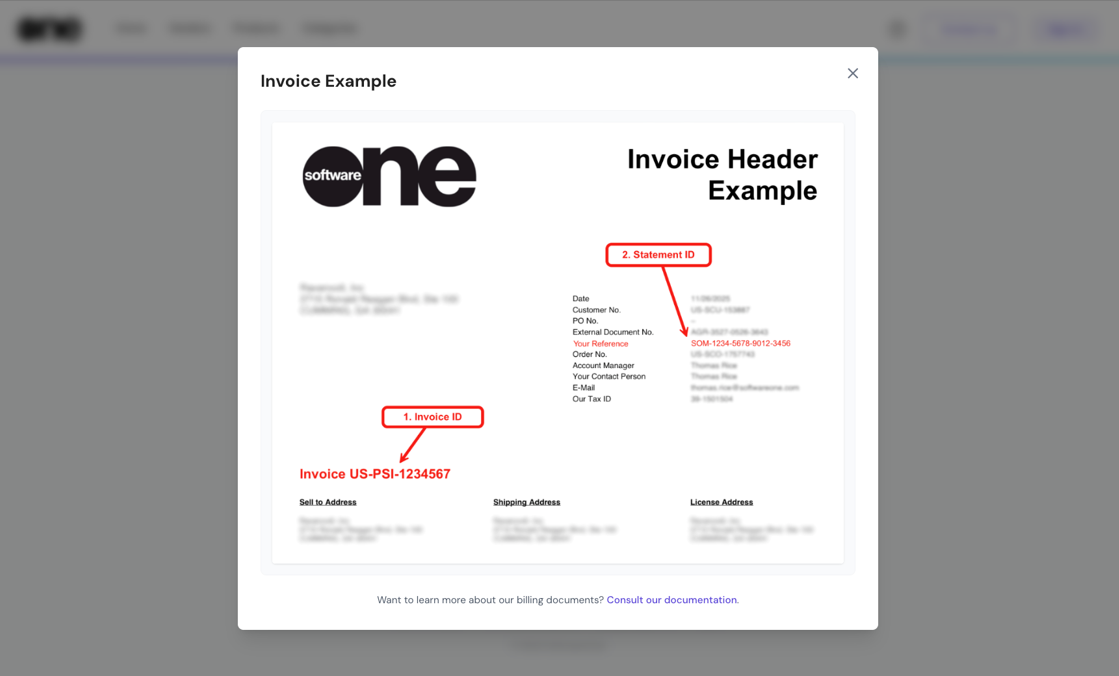
<figure><img src="/files/pvOOzX7dIuPGfguln7e0" alt=""><figcaption><p>The invoice header contains your invoice ID. </p></figcaption></figure>

</details>

<details>

<summary>What is the difference between an invoice and a statement?</summary>

Invoices and statements are both billing documents, but they serve different purposes. The following table lists the key differences between these documents:

| **Purpose**         | Provides a high-level summary of the charges.                             | Provides a full record of the charges from the vendor.     |
| ------------------- | ------------------------------------------------------------------------- | ---------------------------------------------------------- |
| **Format**          | PDF                                                                       | Excel                                                      |
| **Level of detail** | Contains aggregated lines, such as per item, per subscription, and so on. | Can have hundreds or thousands of lines for precise usage. |
| **Use case**        | Used as an official billing and record-keeping document.                  | Used for reconciliation, in-depth audits, and analysis.    |
| **Quantity**        | May displays the quantity as 1 if multiple lines are consolidated.        | Each line shows the actual quantity of items.              |

</details>

### Statements

<details>

<summary>Can I download statements without signing in to my account?</summary>

Yes, if you don’t have access to your account, you can download a statement from the [Billing Statement Download](https://mystatements.platform.softwareone.com/) page. You'll need to provide your Invoice ID and Statement ID.&#x20;

To learn more, see [Download statements](/modules-and-features/billing/statements/download-statements.md).

</details>

<details>

<summary>How do I get a detailed breakdown of charges if I'm only seeing summarized lines?</summary>

You can get a breakdown using the statement link at the top of your invoice. This allows you to download or view the full, itemized breakdown.

</details>

<details>

<summary>Where can I find my statement ID?</summary>

You can find the ID in the [invoice header](/modules-and-features/billing/understand-your-billing-documents.md#invoice-header).

<figure><img src="/files/pvOOzX7dIuPGfguln7e0" alt=""><figcaption><p>The invoice header contains your statement ID. </p></figcaption></figure>

</details>


---

# Agent Instructions
This documentation is published with GitBook. GitBook is the documentation platform designed so that both humans and AI agents can read, navigate, and reason over technical content effectively. Learn more at gitbook.com.

## Querying This Documentation
If you need additional information that is not directly available in this page, you can query the documentation dynamically by asking a question.

Perform an HTTP GET request on the current page URL with the `ask` query parameter, and the optional `goal` query parameter:

```
GET https://docs.platform.softwareone.com/modules-and-features/billing/understand-your-billing-documents/billing-faqs.md?ask=<question>&goal=<endgoal>
```

`ask` is the immediate question: it should be specific, self-contained, and written in natural language.
`goal` is optional and describes the broader end goal you are ultimately trying to accomplish on behalf of the user. GitBook uses it to tailor the answer towards what is most useful for that goal.

The response will contain a direct answer to the question and relevant excerpts and sources from the documentation.

Use this mechanism when the answer is not explicitly present in the current page, you need clarification or additional context, or you want to retrieve related documentation sections.
